sábado, 2 de fevereiro de 2019

Gizmodo Brasil

Gizmodo Brasil


Pilotar um avião de controle remoto com óculos de realidade virtual é o mais perto que dá para chegar de ser o Superman

Posted: 01 Feb 2019 01:09 PM PST

Visual de pilotagem de avião usando realidade virtual

Para pilotar com segurança um quadricóptero por controle remoto capaz de atingir velocidades de mais de 257 quilômetros por hora, pilotos usam óculos de vídeo que lhes dão uma visão em primeira pessoa a partir das pequenas naves. Não é apenas uma maneira mais segura de pilotar aviões por controle remoto, mas também a experiência mais próxima de se voar como o Superman ou o Homem de Ferro, ainda mais a 426 quilômetros por hora. Foi este o caso do youtuber Omegoolibird, com sua aeronave personalizada.

O avião que Omegoolibird utilizou foi um Vasamodel Fusion, que coloca a hélice giratória na parte de trás da aeronave, em vez da frente. Para atingir as velocidades altíssima captadas nesse vídeo, o Fusion foi aprimorado com um motor elétrico Leopard 3674 X2, capaz de atingir velocidades de rotação de até 35 mil RPM. Você pode supor que isso simplesmente trituraria a hélice do avião, mas ele foi projetado especificamente para suportar essas velocidades obscenas e se manter forte. O único efeito colateral, se é que se pode chamar assim, foi o incrivelmente satisfatório e agudo choro da hélice e do motor, que se pode ouvir no vídeo.

O Fusion modificado do Omegoolibird não é o avião de controle remoto mais rápido do mundo; planadores de controle remoto já tiveram velocidades registradas de mais de 800 quilômetros por hora. Mas ser capaz de subir virtualmente a bordo desse pequeno avião graças a uma câmera que faz uma transmissão de vídeo ao vivo do voo o torna muito mais atraente à medida que você experimenta essas velocidades em primeira mão, sem a necessidade de obter sua licença de piloto.

[YouTube via The Awesomer]

The post Pilotar um avião de controle remoto com óculos de realidade virtual é o mais perto que dá para chegar de ser o Superman appeared first on Gizmodo Brasil.

Cientistas descobrem como enviar mensagens secretas diretamente para o seu ouvido por meio de lasers

Posted: 01 Feb 2019 12:43 PM PST

Cientistas conceberam uma forma de se comunicar secretamente, enviando mensagens transmitidas por laser diretamente para a área em torno do ouvido de uma pessoa.

[foo_related_posts]

Os humanos gostam de conversar uns com os outros e muitas vezes o fazem de forma a evitar que os intrometidos ouçam. Essa nova pesquisa poderia ter aplicações militares potenciais — mas vai saber onde mais poderia ser útil?

“A capacidade de se comunicar com um sujeito específico em um local prescrito que carece de qualquer equipamento de comunicação abre muitas possibilidades intrigantes”, os autores escrevem no artigo publicado recentemente na revista Optics Letters.

Como um dispositivo desses funcionaria? Ele pode ajudar a compreender o que é realmente o som: pulsos ou vibrações que viajam através de moléculas de ar para os nossos tímpanos, que depois vibram, tornando-se a entrada analógica que os nossos cérebros interpretam como sons específicos.

O dispositivo gera sons no ar usando um processo chamado efeito fotoacústico. Os pesquisadores sintonizam a luz do laser em um comprimento de onda específico que eles sabem que fará com que as moléculas de água no ar vibrem, mas que não causará danos aos nossos olhos.

Porém, o laser só faz com que as moléculas vibrem — os pesquisadores precisavam introduzir outro elemento para conferir às moléculas de água ambiente do ar mais som do que apenas um único drone ou pulso. Experimentos passados, assim como esse, usaram um instrumento chamado “modulador acústico-óptico” para mudar a força do pulso do laser e, por sua vez, o comportamento das moléculas de água. Mas, neste trabalho, os pesquisadores também desenvolveram um novo método, em que o laser primeiro passa para um espelho giratório rápido, que basicamente espalha o feixe de laser para fora. Ajustar o tamanho do espalhamento produz frequências diferentes.

O novo método produziu sons mais altos que um método mais antigo, de acordo com o artigo; os sons foram amplificados para 60 decibéis, aproximadamente o volume de música de fundo. Pedi aos autores do estudo que descrevessem como é ouvir esses sons especialmente criados.

“Talvez o mais divertido tenha sido ouvir o sistema fotoacústico dinâmico. Tivemos de posicionar os nossos ouvidos no ponto certo (alguns centímetros de extensão) para ouvir o áudio, caso contrário não ouviríamos nada. Foi um efeito um pouco estranho mas satisfatório“, disse Charles Wynn, líder da equipe de pesquisa e membro do Laboratório Lincoln, do MIT.

Wynn também falou sobre as mensagens que foram transmitidas, descrevendo que, primeiro, foram tons únicos e varreduras de frequência usando as técnicas tradicionais e dinâmicas de comunicação fotoacústica.

“Depois, transmitimos formas de onda mais avançadas, como palavras faladas e música (incluindo ‘Malibu’, de Miley Cyrus), usando a configuração fotoacústica tradicional. Com um pouco mais de engenharia, esperamos poder projetar um sistema de comunicações fotoacústicas dinâmico com a largura de banda necessária para codificar e transmitir as mensagens de áudio mais detalhadas”, completou o líder da pesquisa.

Esse trabalho foi apenas um estudo de prova de conceito; o som só podia ser transmitido para os receptores a uma curta distância — de 2,5 metros —, de acordo com o artigo. Mas os pesquisadores estão trabalhando para expandir seu método de trabalho para distâncias maiores.

Há muitos cenários estranhos nos quais você pode imaginar a necessidade de enviar uma mensagem secreta por meio de pulsos de laser. Nos meus sonhos, eles vão substituir as estações numéricas, que me dão pesadelos.

The post Cientistas descobrem como enviar mensagens secretas diretamente para o seu ouvido por meio de lasers appeared first on Gizmodo Brasil.

Facebook e Twitter excluem centenas de contas falsas ligadas a Rússia, Irã e Venezuela

Posted: 01 Feb 2019 11:38 AM PST
Twitter e Facebook anunciaram na terça-feira (29) que haviam recentemente removido centenas de contas ligadas a campanhas de desinformação, aparentemente com ligação a Rússia, Venezuela e Irã. O diretor de políticas de cibersegurança do Facebook, Nathaniel Gleicher, disse em um telefonema com repórteres que as empresas conseguiram identificar maus atores em suas respectivas plataformas por meio de trocas contínuas de informação, noticiou o Hill na quinta-feira (31).

[foo_related_posts]

Gleicher escreveu em um post de blog que o Facebook havia removido quase 800 contas, páginas e grupos no processo, incluindo 162 contas de Instagram. Essas páginas e contas visavam pessoas de regiões ou países específicos, especialmente no Sul Asiático e no Oriente Médio, embora os Estados Unidos tenham sido supostamente alvo dos esforços também.

“Os administradores de página e donos de contas normalmente se representavam como nativos, muitas vezes usando contas falsas, e publicavam artigos de notícias sobre eventos atuais”, disse Gleicher. “Isso incluía comentários que adaptavam a cobertura da mídia iraniana estatal em tópicos como as relações entre Israel e Palestina e os conflitos na Síria e no Iêmen, incluindo o papel dos Estados Unidos, da Arábia Saudita e da Rússia.”

Gleicher acrescentou que algumas das contas que o Facebook removeu estavam ligadas a uma sondagem em andamento sobre as campanhas de desinformação no Irã, descobertas inicialmente no ano passado, quando forma excluídos 82 grupos, contas e páginas depois que se soube que maus atores estavam se passando por cidadãos do Reino Unido e dos Estados Unidos e distribuindo conteúdo politicamente polarizador.

À parte dos esforços de combate às campanhas de desinformação iranianas anunciados nesta semana, o Facebook disse no mês passado que havia agido contra 364 contas e páginas da Rússia e anunciou medidas similares contra ações vindas de Bangladesh em dezembro.

O Twitter também anunciou na quinta-feira que agiu contra centenas de contas ligadas a atividades maliciosas especificamente vindas de Rússia, Irã e Venezuela, assim como “um número muito pequeno de contas” de Bangladesh, escreveu o diretor de integridade do site do Twitter, Yoel Roth, em um post de blog.

A empresa removeu 2.617 contas que pareciam estar ligadas ao Irã desde que soube pela primeira vez dos esforços de desinformação, em agosto. O site também removeu mais de 400 contas suspeitas de estarem ligadas à Rússia, assim como aproximadamente 1.200 da Venezuela que, segundo Roth, podiam estar conectadas a “uma campanha de influência estatal visando públicos nacionais”. As investigações sobre os esforços estariam em andamento, bem como os canais de comunicação entre Twitter e Facebook.

“O Twitter tem estado em contato próximo com nossos colegas de indústria sobre esse assunto e compartilhou informações detalhadas com eles sobre as contas maliciosas”, afirmou Roth. “Esse processo multilateral de compartilhamento de informações continuará, permitindo que nós e nossos colegas da indústria trabalhem juntos para entender e identificar atividades maliciosas.”

[Facebook, Twitter]

The post Facebook e Twitter excluem centenas de contas falsas ligadas a Rússia, Irã e Venezuela appeared first on Gizmodo Brasil.

É claro que a Huawei também vai mostrar seu smartphone dobrável em breve

Posted: 01 Feb 2019 11:23 AM PST

Depois do fim da saída para fones, das câmeras duplas (triplas e quádruplas) e do entalhe na tela, parece que a nova tendência entre fabricantes de smartphones é a tela dobrável. A mais nova a entrar na lista de futuros lançamentos é a Huawei.

[foo_related_posts]

O convite publicado para a apresentação da marca no Mobile World Congress, que acontece em Barcelona, deixa claro que um aparelho flexível será apresentado. Além disso, segundo o Verge, o celular deverá ter conexão 5G. Por enquanto, esse suporte é inútil pois nenhuma rede está preparada para a tecnologia, mas é outra tendência que vem ganhando força — fala-se até em uma versão comemorativa do Samsung Galaxy S10 que teria compatibilidade com o padrão.

Os rumores de que a empresa chinesa estaria preparando um telefone dobrável existem desde meados de 2018 — inclusive, ele deveria ser lançado antes do modelo de tela flexível da Samsung, que deve aparecer no evento Unpacked 2019 em 20 de fevereiro.

Além de Samsung e Huawei, a Xiaomi também parece estar preparando um aparelho com a mesma ideia — ela, inclusive, mostrou um conceito bem bacana recentemente, uma espécie de tablet que dobra as extremidades para diminuir a tela e se "transformar" em smartphone. Já a LG parece tomar outro caminho: rumores indicam que seu G8 terá uma tela extra acoplável ao aparelho.

O único smartphone com tela dobrável até agora no mercado, no entanto, é o Royole FlexPai, que não funciona tão bem assim. Tomara que esses próximos aparelhos sejam melhores. Não que sair por aí com um tablet dobrado no bolso seja um sonho, mas vai, até que é uma ideia bacana.

[The Verge]

The post É claro que a Huawei também vai mostrar seu smartphone dobrável em breve appeared first on Gizmodo Brasil.

Clientes Itaú, Credicard e Itaucard agora podem realizar pagamentos com Google Pay

Posted: 01 Feb 2019 10:37 AM PST
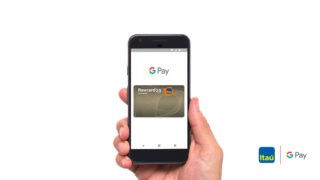
Os clientes que possuem algum dos cartões de crédito Itaú, Credicard ou Itaucard já podem usar o Google Pay para fazer pagamentos. A novidade foi anunciada nesta quinta-feira (31) e, segundo as empresas, cartões adicionais e de débito do Itaú devem passar a funcionar em breve.

[foo_related_posts]

O Google Pay consiste na união de dois produtos do Google: o Android Pay (que permite pagamentos em lojas físicas) e o Pagar com o Google (que permite fazer pagamentos online, como no iFood, a partir de um cartão vinculado a sua conta de e-mail).

Quem tem um smartphone Android (a partir do Lollipop 5.0) com tecnologia NFC pode fazer pagamento por aproximação nas maquininhas compatíveis – é só encostar o celular. Uma das vantagens desse método de pagamento é o fato de o número do seu cartão não ser compartilhado com os estabelecimentos. É uma forma, inclusive, de se proteger de clonagem e roubo de informações.

As compras são sempre validadas por senha ou pelo leitor de impressão digital do celular. Para completar uma operação, "é enviado um número de conta virtual para representar as informações da sua conta", como explica o próprio Google.

A novidade está disponível para clientes que possuem smartphones Android e cartões de crédito Itaú, Credicard ou Itaucard (Nacional, Internacional, Gold e Platinum) com as bandeiras Visa ou Mastercard. Clientes que possuem cartão múltiplo (funções débito e crédito no mesmo plástico) também poderão usar o Google Pay, mas por enquanto apenas na função crédito.

Banco do Brasil, Bradesco, Caixa, Neon, Next e Porto Seguro são alguns dos bancos e instituições financeiras que possuem compatibilidade com o Google Pay. Você pode conferir a lista completa neste link.

The post Clientes Itaú, Credicard e Itaucard agora podem realizar pagamentos com Google Pay appeared first on Gizmodo Brasil.

2019 pode ser o ano em que seu smartphone deve ganhar um modo escuro verdadeiro — seus olhos agradecem

Posted: 01 Feb 2019 07:17 AM PST

O Windows 10 tem já há um tempo a possibilidade de configurar o modo escuro, e a Apple adicionou o recurso na atualização Mojave do macOS no ano passado. Mas, estranhamente, nem o iOS nem o Android puro contam com uma opção verdadeira de sistema que os deixem em modo escuro.

[foo_related_posts]

No entanto, baseado em vazamentos recentes sobre software, isso deve mudar completamente em 2019 para usuários do iOS e do Android. No início do mês, o Android Police notou um comentário feito pelo funcionário do Google Lukasz Zbylut no rastreador de erros do Chromium de que o modo escuro é uma funcionalidade já aprovada para o Android Q.

Reforçando este rumor, o XDA Developers conseguiu dar uma olhada numa prévia do Android Q mostrando um modo super escuro em ação, e embora o desenvolvimento esteja no estágio inicial, os tons mais escuros em vários menus do Android já parecem um alívio para olhos cansados.

Se você reparar, vários aplicativos do Google ganharam temas escuros no ano passado, como o YouTube, o app de telefone, contatos, Google Notícias e até o inicializador do Pixel. Então, todas as dicas apontam que a companhia deve dar um grande passo em direção a um modo escuro mais abrangente.

Enquanto isso, na iOS, embora você consiga alguns efeitos de um modo escuro usando a opção "Inversão de cores inteligentes", não é a mesma coisa que um verdadeiro modo escuro. No entanto, de acordo com uma nova reportagem da Bloomberg, que cita câmeras 3D à laser na traseira do iPhone e rumores sobre a adoção da porta USB-C em iPhones, a Bloomberg diz que o iOS 13 contará com uma nova opção de modo escuro para "melhorar a visualização do smartphone à noite".

Se tudo isso se confirmar, 2019 pode ser um bom ano para quem quer se livrar de menus e telas muito claras em seus smartphones. Afinal, olhar para uma tela branca não é igual a olhar para uma folha em branco, e já está na hora de nossos gadgets terem menus e interfaces de usuários que façam sentido em um mundo digital.

[Bloomberg]

The post 2019 pode ser o ano em que seu smartphone deve ganhar um modo escuro verdadeiro — seus olhos agradecem appeared first on Gizmodo Brasil.

EUA também sofrem cada vez mais com chamadas automáticas que caem logo que você atende

Posted: 01 Feb 2019 06:10 AM PST

Se você já tem até receio de atender o celular por causa das chamadas robotizadas que ficam mudas e caem logo após você deslizar para o lado, você não está sozinho. Já mostramos aqui que o Brasil é um país que sofre muito com essa situação, mas o problema também está crescendo nos Estados Unidos. Mais especificamente, um relatório recém-divulgado descobriu que 26,3 bilhões de chamadas robotizadas foram feitas para números de telefone norte-americanos em 2018, representando um aumento de 46% em relação a 2017, que teve 18 bilhões. Credo.

[foo_related_posts]

O relatório foi compilado pelo Hiya, um aplicativo de monitoramento de chamadas de spam. Nele, descobriu-se que o norte-americano médio recebeu dez chamadas de spam por mês, com os principais códigos de área visados pelos autores de spam vindo principalmente do Texas. Dallas (214), Fort Worth (817) e San Antonio (210) lideraram a lista.

Os dados são alarmantes, embora um relatório de novembro da Comissão Federal de Comércio dos EUA (FTC) sobre o “Registro de Bloqueio de Chamadas” (Do-Not-Call Registry) tenha mostrado uma queda geral nas reclamações apresentadas no ano fiscal de 2018. De outubro de 2017 a setembro de 2018, a agência recebeu cerca de 5,7 milhões de reclamações, das quais 3,8 milhões eram relatos de chamadas robotizadas e 1,9 milhão de chamadas ao vivo. Esse número é inferior ao de 7,1 milhões de queixas no ano fiscal de 2017, das quais 4,5 milhões eram relativas a chamadas robotizadas. Porém, ainda que o número total de queixas possa ter diminuído, a porcentagem de queixas de chamadas robotizadas aumentou de cerca de 63% do total para 66%. E, segundo o banco de dados atualizado da FTC para o Do-Not-Call Registry, os tipos mais comuns de chamadas robotizadas recebidas eram relacionadas principalmente a redução de dívidas, prescrições médicas e impostores.

Enquanto isso, a Comissão Federal de Comunicações (FCC) informou que recebeu mais de 52 mil queixas sobre spoofing de identificação de chamadas somente em 2018.

O problema com chamadas robotizadas ganhou atenção nacional nos Estados Unidos e criou pressão federal para resolver o problema. Embora tanto a FTC quanto a FCC tenham sido afetadas pela paralisação do governo, foi apresentado um projeto de lei do Senado que poderia atingir quem executa ligações robotizadas com uma multa de US$ 10 mil por cada chamada.

Além disso, há esperança para 2019. Em novembro, o presidente da FCC, Ajit Pai, pediu às operadoras que adotassem o protocolo SHAKEN/STIR, que atua como um tipo de autenticação de chamador. A T-Mobile é atualmente a primeira operadora americana a implementar o SHAKEN/STIR, anunciando no início deste mês que os usuários começariam a ver avisos de “Chamada Verificada” em telefones compatíveis.

[Verge, Washington Post]

The post EUA também sofrem cada vez mais com chamadas automáticas que caem logo que você atende appeared first on Gizmodo Brasil.

Google também teve apps internos desativados após Apple descobrir quebra de regras

Posted: 01 Feb 2019 05:06 AM PST

Assim como aconteceu com o Facebook, o Google teve seu certificado da Apple revogado temporariamente, o que fez com que vários apps internos da empresa parassem de funcionar. O motivo para tirar o certificado foi o fato de a companhia ter burlado as regras do ecossistema da empresa da maçã.

[foo_related_posts]

Na quarta-feira (30), foi revelado que o Google burlou as políticas da Apple ao distribuir um app de pesquisa chamado Screenwise meter usando um sistema de certificados corporativos de uso interno — a via normal seria colocá-lo na App Store ou usar o Test Flight, um sistema interno da loja de aplicativos usado para testes de terceiros. A gigante das buscas dava gift cards para usuários que concordassem em ceder dados pessoais.

O Google posteriormente confirmou o uso indevido e disse que "foi um erro" usar o sistema da Apple dessa forma. A empresa desabilitou o app, mas a admissão de culpa não impediu que a Apple banisse temporariamente o certificado corporativo da companhia de buscas.

O Verge informou que a Apple desativou vários apps internos para iOS do Google, que uma fonte disse que incluía versões não lançadas comercialmente do Google Maps, Hangouts, Gmail, Gbus e um app da cafeteria da empresa.

Em um comunicado posterior, a Apple disse que "qualquer desenvolvedor que use os certificados corporativos para distribuir apps para consumidor terão seus certificados anulados".

Nesta semana, foi descoberto que tanto o Google quanto o Facebook executavam tal prática, o que também fez com que todos os apps internos do Facebook ficassem desativados, incluindo "um que os funcionários usavam para coordenar o transporte para voltar para casa e outro para ver o cardápio do almoço do dia".

De acordo com o TechCrunch, nos dois casos, o certificado foi restaurado.

[The Verge]

The post Google também teve apps internos desativados após Apple descobrir quebra de regras appeared first on Gizmodo Brasil.

Criaram um robô capaz de jogar Jenga tão bem quanto humanos

Posted: 01 Feb 2019 03:25 AM PST

É necessária uma mão firme para jogar um jogo como o Jenga sem derrubar a torre, mas ser um empilhador de blocos bem sucedido também requer um apurado sentido de toque ao tentar encontrar a peça perfeita para remover. Até recentemente, isso significava que robôs que dependiam apenas de dados visuais não eram realmente muito bons em jogar Jenga (ponto para a humanidade!). Porém, adicionando um senso de toque, pesquisadores mais uma vez deram aos autômatos a vantagem, criando o robô jogador de Jenga ideal.

[foo_related_posts]

Desde quando nascem, os humanos aprendem a interagir com o mundo à sua volta por meio de uma combinação de visão e toque. Leva anos de tentativas e erros para entender completamente a física que governa nossas vidas diárias, mas, eventualmente, descobrimos os prós e contras da gravidade, da fricção e de outras forças em jogo. Você provavelmente não pensa muito nos sentidos físicos em que confia para sondar os blocos em uma torre Jenga, mas imagine tentar determinar o melhor movimento apenas olhando para a torre. Seria uma queda a cada tentativa.

Em um artigo publicado no periódico Science Robotics, pesquisadores do Instituto de Tecnologia de Massachusetts (MIT), em Cambridge, liderados por Nima Fazeli, desenvolveram um robô capaz de aprender a jogar Jenga como os humanos, confiando tanto nas pistas visuais quanto no feedback físico de nossos dedos. No caso desse braço robótico, os dedos eram um par de sondas de agarrar que conseguiam sentir os movimentos e a fricção de um bloco que tocasse, da mesma forma como um jogador humano faria.

Os dados visuais sobre a torre ainda eram importantes para o sucesso do robô — imagine tentar jogar Jenga estando vendado. Por isso, além de ser muito sensível, ele também contava com uma câmera que capturava a forma e a posição da torre ao longo do tempo. Mas o que é mais impressionante nessa pesquisa é que o robô não foi explicitamente ensinado a jogar Jenga, e também não lhe foi dito como os vários blocos de madeira se movem ou interagem entre si.

A capacidade de sentir também facilitou a habilidade do robô de aprender a jogar sozinho, tanto em termos de encontrar um bloco que estava solto o suficiente para ser removido quanto de reposicioná-lo no topo da torre sem perturbar o delicado equilíbrio. Em cerca de cem jogos, ele descobriu que tentar mover um bloco que não deslizaria facilmente não era benéfico para a progressão do jogo.

Jogar Jenga não está exatamente no topo da lista de razões para possuir um robô, mas a pesquisa vai ajudar a tornar as máquinas mais adaptáveis para outras tarefas. Em fábricas, os robôs são atualmente programados para executar movimentos e ações muito específicos a fim de realizar trabalhos muito particulares.

A longo prazo, essa pode ser uma solução mais rentável para uma grande empresa do que pagar a um humano para fazer o mesmo trabalho monótono. Mas será que queremos mil robôs em nossas casas todos programados para fazer uma tarefa específica? É óbvio que não. Ensinar um robô a aprender a fazer uma infinidade de tarefas e a se adaptar a um número em constante mudança de variáveis é uma abordagem muito melhor.

[Science Robotics]

The post Criaram um robô capaz de jogar Jenga tão bem quanto humanos appeared first on Gizmodo Brasil.

Tomar café da manhã talvez não seja tão útil para perda de peso

Posted: 01 Feb 2019 02:37 AM PST

Dizem frequentemente que o café da manhã é a refeição mais importante do dia, mas, de acordo com uma revisão nova divulgada na quarta-feira (30) no periódico científico BMJ, ele não te ajuda a perder o peso. O estudo não encontrou nenhuma boa evidência de que tomar regularmente café da manhã nos ajuda a reduzir as calorias ou evitar o ganho de peso. Aliás, encontraram até mesmo evidências de que pular completamente o café da manhã seria melhor para a circunferência das nossas cinturas — embora seja melhor você achar melhores maneiras de permanecer em forma.

[foo_related_posts]

Há boas razões para comer no início do dia, especialmente se você for jovem. Pesquisas já mostraram que tomar regularmente um café da manhã saudável (pense em frutas, legumes e grãos integrais) ajuda crianças e adolescentes a se desenvolverem normalmente e a se manter mentalmente afiados na escola. Muitas organizações de saúde pública e médicos também recomendaram adicionar um café da manhã saudável à sua rotina como forma de prevenir a obesidade ou promover a perda de peso.

A teoria por trás desse conselho é simples: comer cedo aceleraria o seu metabolismo e evitaria que você sentisse fome extra e comesse demais em refeições posteriores. Existem evidências dessa teoria em alguns estudos. No entanto, esses estudos são geralmente observacionais, o que significa que os pesquisadores apenas procuram associações indiretas entre duas coisas (neste exemplo, tomar ou não o café da manhã e a perda de peso ou menor obesidade) num grupo de pessoas de tamanho razoável. Mas, nos últimos anos, alguns estudos randomizados e controlados — muitas vezes considerados o padrão de ouro das evidências — não encontraram a mesma ligação.

“O problema é que os que tomam o café da manhã tendem a ser diferentes dos que não tomam. Portanto, o problema com estudos observacionais é que pode não ser a ingestão do café da manhã que é boa, mas, sim, o estilo de vida saudável mais amplo do indivíduo e suas escolhas alimentares que resultam em benefícios sobre o peso”, disse a autora sênior Flavia Cicuttini, epidemióloga da Universidade Monash, na Austrália, em entrevista ao Gizmodo por e-mail.

Cicuttini e sua equipe decidiram reunir e analisar o máximo de testes clínicos relevantes possível sobre o tema para ajudar a resolver a questão, algo que os cientistas chamam de metanálise. Eles analisaram 13 testes, realizados nos Estados Unidos, Reino Unido e Japão entre 1992 e 2016, que estudaram coletivamente mais de 500 adultos com peso e índice de massa corporal variáveis. Alguns dos ensaios testaram se a adição ou não do café da manhã poderia afetar o peso; outros analisaram se o café da manhã afetaria as calorias totais de uma pessoa em um dia.

“Descobrimos que aqueles que tomavam café da manhã tendiam a comer cerca de 260 calorias extras por dia a mais e, em média, ganhavam 0,44 kg”, disse Cicuttini. “É importante ressaltar que não havia evidência de melhoria do metabolismo naqueles que tomavam café da manhã ou que eram menos propensos a comer demais no final do dia.”

Esse padrão se manteve independentemente de onde os estudos foram realizados ou quanto pesavam os voluntários.

Os autores acrescentaram que suas descobertas não devem ser tomadas como definitivas. Em primeiro lugar, a qualidade geral da evidência que eles analisaram foi considerada baixa. Poucos estudos cegaram os voluntários, o que significa que eles sabiam se estavam tomando café da manhã ou não. É verdade que isso pode ser difícil de esconder de alguém, mas os estudos também raramente cegaram os pesquisadores que tinham que medir e calcular os resultados que obtiveram dos voluntários — outra coisa inaceitável na ciência. Todos os estudos, constatou a equipe, também tinham um risco alto ou pouco claro de viés.

Os autores dizem que é preciso realizar mais pesquisas, preferencialmente de testes grandes de alta qualidade, para ter certeza absoluta de qualquer coisa. Mas, enquanto isso, disse Cicuttini, existem aprendizados claros a se tirar de seu trabalho.

“A mensagem principal é que, se uma pessoa gosta de tomar café da manhã, tudo bem”, afirmou Cicuttini. “Entretanto, não existem provas de que deveríamos incentivar as pessoas a mudar seu hábito alimentar de modo a incluir o café da manhã para evitar ganho de peso ou obesidade… O efeito pode ser contrário!”

The post Tomar café da manhã talvez não seja tão útil para perda de peso appeared first on Gizmodo Brasil.


How to Get Rid of Algae in Ponds

Posted: 01 Feb 2019 04:00 PM PST

A pond can be a beautiful and ornamental addition to a garden or home, but it might lose some of its charm if the water is green and murky with algae. Whether you want a cleaner pond in the long-term with more natural solutions, prefer to use mechanical or chemical solutions to remove algae from the pond, or want to prevent algae from building up, there are several easy options that can help you achieve your goal.

EditSteps

EditCleaning Algae with Natural Solutions

  1. Plant aquatic plants in your pond to absorb algae forming nutrients. As a living organism, algae draws nutrients from the water in order to live. Add some more appealing plants, such as lily pads, cattails, or watercress, to your pond that will suck up all of those nutrients and stop algae from being able to grow. This can help keep your water clear and make your pond look more interesting.[1]
    Get Rid of Algae in Ponds Step 1 Version 2.jpg
    • Your local nursery or garden store should have a wide selection of plants perfect for your pond. Ask if you're unsure about the best types of plant to use.
    • For best results, cover around 60% of the surface of your pond with plants.
  2. Avoid overfeeding your fish to stop leftover food from rotting. If you have fish in your pond, you should only feed them the amount of food that they can consume in around 5 minutes. If you feed them more than this, the excess food will drift to the bottom and rot, which can be a catalyst for algae growth.[2]
    Get Rid of Algae in Ponds Step 2 Version 2.jpg
    • If you're unsure about how much to feed your fish, check the instructions on your fish food for a rough guide. You should be feeding your fish once a day with a small sprinkling of food. Watch your fish for 5 minutes after you feed them to see how much food is left over and adjust accordingly.
  3. Remove the algae from the surface of your pond with a skimmer or algae net. The easiest way to clean algae from the top of a pond is simply lifting it up and off. Use a skimmer or algae net to skim the surface of your pond, pulling the algae free and removing it from the pond. This may take a while, but will give you immediate results when it's done.[3]
    Get Rid of Algae in Ponds Step 3 Version 2.jpg
    • Although this is a very quick solution, it's not one that will work long-term. Removing the algae won't stop it from growing back.
  4. Add barley straw to the pond to slowly kill the algae. As it rots, barley straw will slowly release small amounts of hydrogen peroxide that will kill any algae growing in your pond. Buy a small bale of barley straw and throw it into your pond when you first notice algae growing in your pond. Over the course of a few weeks, you should notice the algae in your pond disappearing.[4]
    Get Rid of Algae in Ponds Step 4 Version 2.jpg
    • Use of barley straw for every of water in your pond.[5]
    • Barley straw should be available from your local pet shop, as it is used for bedding for a lot of small animals. Otherwise, it may be available at a specialty pond store or online.
    • The amount of hydrogen peroxide released by the rotting barley straw should be just enough to kill the algae, without killing any other plants in your pond.
  5. Introduce algae eating creatures to your pond. Similarly to using plants to prevent algae from growing, there are plenty of animals you can add to your pond that will directly feed of algae. Add a few tadpoles or some aquatic pond snails to your pond and keep an eye on them as they grow. They should begin eating the algae in your pond, as well as bringing a little more life to it.[6]
    Get Rid of Algae in Ponds Step 5 Version 2.jpg
    • Tadpoles will also eat mosquito and other insect larvae that may settle on the top of your pond.

EditUsing Mechanical and Chemical Solutions

  1. Install a fine bubble aerator to increase the movement of the water. One of the main causes of algae bloom is the lack of water movement. Purchase a fine bubble aerator and install it in the deepest section of your pond. This will constantly aerate the water, keeping it moving to produce a healthier environment in the pond and prevent harmful algae.[7]
    Get Rid of Algae in Ponds Step 6 Version 2.jpg
    • Fine bubble aerators should be available from a specialty pond store. If you don't have one nearby, there are plenty of online retailers that sell aerators.
  2. Clean your filtration system once a month to keep the water clean. If your pond has a filtration system installed but algae is still able to grow, you may need to clean the filter inside the system more often. Follow the manufacturer's instructions to clean your filter at least once each month to prevent algae from forming.[8]
    Get Rid of Algae in Ponds Step 7 Version 2.jpg
    • A pond filter isn't necessary, but can be useful in keeping the water in your pond clean.
    • If you have a large mechanical filter, you should be able to clean it by attaching a backwash hose and backwashing the filter until the water runs clear.
    • For smaller filters, remove the filter and clean it with non-chlorinated water to remove any obvious grime, gunk, or algae.
    • Make sure you clean out your pond filter away from the pond. If you clean it too close the pond, everything you remove from the filter will end up back in your pond over time.
  3. Use an ultraviolet light sterilizer to destroy algae. Ultraviolet light is great at sterilizing and damaging a lot of organic materials, including algae. Install a pond filter that has an ultraviolet light sterilizer in your pond to break down and destroy algae as it grows. After 3 to 5 days, your water should be free of algae and clear.[9]
    Get Rid of Algae in Ponds Step 8 Version 2.jpg
    • Filters with UV light sterilizers will be more expensive than other filters, but also a lot more effective. They should be available from a specialty pond store or online.
    • This is a very effective way to kill algae in ponds, but may also harm beneficial bacteria and other positive organic material in your pond.
  4. Treat the pond water with algaecides. If you can't clean your water and remove your algae any other way, you can use algaecides to treat the water and kill the algae. Purchase an algaecide or herbicide that contains copper and spray it over your pond to begin killing off the algae. You should see the algae begin to die off within 3 to 10 days from the first treatment.[10]
    Get Rid of Algae in Ponds Step 9 Version 2.jpg
    • Algaecides and herbicides are made of chemicals that are designed to kill algae, so they will be more harmful than other natural methods used to remove algae. Use algaecides as a last resort. Always consult the instructions on your chosen algaecides or herbicides before using them in a pond with plants or living creatures.
    • Make sure you check with local regulations before treating your water with an algaecide. You may need a permit for some chemicals in some locations.
    • Always follow the manufacturer's instructions when working with an algaecide. Using more than is required may damage your pond or harm any wildlife living in or around it.

EditPreventing Algae from Forming

  1. Build your pond in a shady area to limit sunlight. Algae needs sunlight to grow, so if you're still in the planning stages of a new pond, consider installing it in an area that only gets a little sun. Try building a pond near a tall wall, or use a shade mat or sail to stop algae from being able to grow.[11]
    Get Rid of Algae in Ponds Step 10 Version 2.jpg
    • You shouldn't rely on shade that comes from large trees, as they may drop leaves into the pond. Fallen leaves will eventually rot and let algae grow, meaning you'll need to clean your pond more often.
    • Shade mats and sails are custom-made barriers that will prevent excess sunlight from getting into your pond. They should be available at specialty pond stores or online.
  2. Add a rim or border around your pond to keep out new water. Water that runs off from your garden may contain nutrients that algae can feed on to grow. Build a slight lip rim, roughly high, around the edge of your pond to limit uncontrolled water from flowing into the pond.[12]
    Get Rid of Algae in Ponds Step 11 Version 2.jpg
    • This will also help keep fertilizer, herbicides, and pesticides from getting into your pond through water runoff. All of these can be very detrimental to the health of your pond and the living things in it.
  3. Color the water with a pond dye to reduce the amount of sunlight absorbed. There are several dyes, normally blue in color, that are designed to be added to a pond to stop sunlight from reaching the bottom, which will prevent the formation of algae. Purchase a pond dye of your choice and follow the manufacturer's instructions to dye your pond. [13]
    Get Rid of Algae in Ponds Step 12 Version 2.jpg
    • Pond dye should be available online or at your local specialty pond store.
    • The amount of pond dye needed will vary based on the size of your pond. Always follow the manufacturer's instructions to avoid over-dyeing your pond.

EditVideo

EditTips

  • Make sure to properly size your pump, filtration system, and UV sterilizer.
  • Some types of algae are actually beneficial for your pond, providing food for fish and controlling nitrate levels. If you're unsure what type of algae is in your pond, look online to identify it and determine if it is harmful or beneficial.
  • If the level of algae gets to a point where the fish are dying, drain the whole pond and scrub it all off. Add new water that has been left for 24 hours before returning the fish.

EditRelated WikiHows

EditSources and Citations

EditQuick Summary


Cite error: <ref> tags exist, but no <references/> tag was found


How to Become a Babysitter

Posted: 01 Feb 2019 08:00 AM PST

If you love being around kids and are looking to make some extra cash, becoming a babysitter can be a great idea. However, whether you're 12 or 24, you'll be a better babysitter if you take the time to prepare for the role. To ensure the safety of the kids you watch and the success of your babysitting career, you should evaluate your strengths and weaknesses, get appropriate training and certifications, and make sure you line up gigs that suit you well.

EditSteps

EditEvaluating Your Interests and Readiness

  1. Be honest with yourself about your maturity level and readiness. Babysitting may seem like "easy money," especially if you have experience watching younger siblings at home. However, it is a real job that can have very real consequences if you're not prepared or mature enough to handle it. Ask yourself questions like:[1]
    Become a Babysitter Step 1.jpg
    • "Am I old enough?" — Most families will be uncomfortable hiring anyone under 11, and may in fact prefer babysitters who are 14 or older.
    • "Am I mature enough to watch kids by myself?" — You need to have focus, stamina, and emotional control to be able to successfully babysit kids. Even if you're a young teen, you need to be able to be the adult in the room.
    • "Can I dedicate myself to the job?" — Babysitting takes a lot of time and energy, so make sure you can handle the stress and the time taken away from things like schoolwork.
  2. Ask yourself how much you like, understand, and know about kids. This may seem silly, but ask yourself directly: "Do I like being around kids?" If you can't answer with an enthusiastic "yes!" you should find another way to make some money—maybe by doing yardwork around the neighborhood.[2]
    Become a Babysitter Step 2.jpg
    • Also ask yourself things like: "Can I change a diaper?"; "Do I know when kids start walking?"; "Do I know how to calm a child who bumps an elbow or scrapes a knee?" If your answers are "no," seek advice from, and opportunities to observe and assist, friends and family with small children.
  3. Decide whether you have other desirable qualities for a babysitter. Great babysitters all have their own individual skill sets, and different babysitting gigs call for different abilities. However, there are some general qualities that nearly all good babysitters have, including:[3]
    Become a Babysitter Step 3.jpg
    • The ability to communicate with kids. Do you know how to speak simply, calmly, directly, and positively with a child?
    • Respect for differences. Are you comfortable around people who may have different lifestyles, belief systems, or economic backgrounds than yours?
    • A willingness to be a good role model. Can you be someone who kids will look up to and want to emulate?
  4. Consider your willingness to make decisions and take action. As a babysitter, you must be willing and able to make quick decisions to ensure the safety and well-being of the kids you're watching. Often, the kids won't like it, but you must be able to do what is best for them. In fact, sometimes you must be willing to upset the parents in order to do the right thing.[4]
    Become a Babysitter Step 4.jpg
    • For example, if you see signs of potential abuse—for instance, frequent, unexplained bruises; fear of physical contact or undressing; unsafe living conditions—you must be willing to act. You need to confide in an adult you trust and work with them to call a child abuse hotline or the police.

EditGetting Training and Certifications

  1. Check on the laws, regulations, and required certifications where you live. In some places, there may be few restrictions on who can be a babysitter. In other places, you may need to complete specific training programs and be licensed by the appropriate government authority. Before you begin trying to get babysitting gigs, make sure you meet the requirements where you live.[5]
    Become a Babysitter Step 5.jpg
    • There may, for instance, be age restrictions in your area that you don't yet meet.
    • Ask other babysitters for information on regulations where you live. Also call or check the website of the health, human services, or similar department of your local government.
  2. Take a babysitting training class from a well-regarded organization. Whether or not a training program certification is required where you live, you'll find it much easier to get babysitting jobs if you are certified. Certification lets parents know that you've put in the time and effort to become a knowledgeable, professional babysitter.
    Become a Babysitter Step 6.jpg
    • Look for in-person or online certification programs from reputable organizations, such as (in the U.S.) the American Red Cross.[6]
    • You must be at least 11 years old to take the Red Cross babysitting certification course. The course costs around $40-$50 USD.
    • Local colleges or universities might also offer certification programs.[7]
  3. Get First Aid and CPR certifications as well. In some cases, First Aid and CPR certification might be included within your babysitting certification. If they aren't, it's worth your time to get these certifications as well. Doing so will make you that much more prepared—and appealing to potential employers.
    Become a Babysitter Step 7.jpg
    • The American Red Cross, for instance, offers First Aid and CPR certifications in conjunction with babysitting certification, but they aren't required. Red Cross First Aid and/or CPR courses cost in the $80-$100 USD range.[8]
  4. Keep a high-quality babysitting handbook as a valuable resource. You'll probably be given a handbook as part a babysitting certification course. Keep this guide as a handy reference as you look for, and eventually take on, babysitting jobs.
    Become a Babysitter Step 8.jpg

EditFinding Babysitting Gigs

  1. Start by working alongside family members or friends. Before taking on paid babysitting jobs, try helping out a family member or friend with childcare responsibilities. And, if possible, see if you can "tag along" with an established babysitter on one of their jobs. This way, you'll get a feel for the responsibilities involved without yet being the person in charge.[9]
    Become a Babysitter Step 9.jpg
    • Make sure you get the permission of the family before "tagging along" on a babysitting gig. If they're willing to pay you a little, great. But expect it to be an unpaid volunteer experience.
    • Also keep in mind that you're there to learn, not to hang out with your friend who happens to be a babysitter.
  2. Determine your specialties, preferences, and limitations for babysitting. Some babysitters focus on watching kids, while others also care for pets, prepare meals, do some light cleaning, and so on. Figure out exactly what type of babysitting jobs you'd like to do by asking yourself questions like:[10]
    Become a Babysitter Step 10.jpg
    • "What age range of children would I like to work with?" -- For instance, are you comfortable working with infants?
    • "How many kids am I willing or able to care for at once?" -- For a new babysitter, one kid can often seem like plenty!
    • "Am I willing to care for pets as well?" -- If so, just cats and dogs, or more exotic pets like birds or reptiles?
    • "How far am I willing to travel to babysit?" -- How are you going to get to your gigs, and how much will it cost you in time and/or money? If you don't drive yet, you may need to rely on a parent or someone else to get you to your jobs.
    • "How late can I work, and which days of the week can I work?" -- You might want to limit yourself to weekends and no later than 11 pm, for example. If you're a teen, this is also something you'll need to work out with your parents.
  3. Create a babysitting resume. A babysitting resume can be a simplified version of a full career resume, and usually only needs to be a single page long. List your contact information at the top, then categories like "Education," "Certifications," and "Experience." Print out a copy of the resume to bring to each interview you do.[11]
    Become a Babysitter Step 11.jpg
  4. Use word-of-mouth to identify potential babysitting gigs. Rely on your network of family friends, neighbors, your parents' work colleagues, and other people who already know you to get your first babysitting jobs. If you need some help finding leads, talk to older siblings or their friends who are babysitters.[12]
    Become a Babysitter Step 12.jpg
    • Especially if you're a pre-teen or teen, you should not try to advertise your services online or by posting flyers around town. It can be unsafe to share your address and/or contact information publicly.
    • If you're 18 or older, you might consider signing up for one or more of the several websites that help connect babysitters with jobs; for instance (in the U.S.), https://www.sittercity.com/babysitters or https://www.care.com/babysitters.

EditInterviewing with a Family

  1. Be polite, friendly, prepared, and on-time. All parents want their children to be watched by a babysitter who is trustworthy, mature, and reliable. So, when you have the opportunity to interview with a potential employer, put your best foot forward by arriving on-time and ready to chat.[13]
    Become a Babysitter Step 13.jpg
    • It's fine to dress in age-appropriate clothes, but make sure they're clean and relatively modest. You want to look a little mature for your age, but not like you're trying to pretend you're an adult already (unless you are one!).
    • Show some enthusiasm for the job by being friendly and engaging. If you're nervous, take a few deep breaths before knocking on the door.
  2. Ask specific questions and get specific answers. A babysitting interview should definitely be a two-way interview. That is to say, you should also be asking questions, not just answering them. Make sure this opportunity and this family is right for you by asking things like:[14]
    Become a Babysitter Step 14.jpg
    • "Will you always be back by 10 pm, or would I be expected to work past that sometimes?"
    • "Would I be giving the children baths and putting them to bed?"
    • "Would I need to feed, watch, and let out the dog as well?"
    • "Are there foods or snacks that are off-limits for your kids?"
    • "Is your youngest child fully potty-trained yet?"
  3. Negotiate your pay rate before accepting the job. The average pay rate for babysitters in the U.S. is around $15 USD per hour, but this can vary widely by location. Ask other babysitters in your area how much they charge per hour. Use this information to determine how much you want to charge, as well as the minimum amount you're willing to accept for the gig.[15]
    Become a Babysitter Step 15.jpg
    • If you have to travel a fair distance to get to the job, factor in things like travel expenses as well. You might want to ask for $5-$10 per shift for fuel, for example.
    • If you're new to babysitting, expect to start at a lower rate than experienced babysitters. After you prove your reliability, you can ask for a raise.
  4. Confirm the key details on hours, payment, and emergencies. You may want to get these key details in writing—at the very least, make sure you and the parents are completely clear and in agreement on them. You might want to ask them directly: "So, I'll work every Friday and Saturday from 6-10 pm and not later, you'll pay me $15 per hour in cash each night, and I can reach you at any time at 555-555-5555. Is that right?"[16]
    Become a Babysitter Step 16.jpg
    • Make sure they provide you with a backup number (for a relative, neighbor, etc.) if they can't be reached for some reason, and clarify when it would be appropriate for you to call emergency services.
  5. Spend time with the kids and observe the family at home. During or right after the interview, ask if you can meet the kids and spend a little bit of time with them. Even better, ask if you can drop by for a couple hours sometime and observe the family in action at home. Doing so will help you get a good impression of the kids and the expectations the parents have for their care.[17]
    Become a Babysitter Step 17.jpg
    • Not all kids and families are going to be the best match for you. If the kids seem like they're more than you can handle, or if the parents seem too demanding (or even not demanding enough), consider looking for another gig.

EditVideo

EditTips

  • Be self-confident. Carry yourself with self-assurance, smile, and be sure of your decisions to show that you're mature and independent.
  • Show good manners to the kids and the parents. This includes being respectful of a family's privacy by not going through closets and personal possessions.

EditWarnings

  • Make sure you know what to do when there's an emergency. Don't freeze up.

EditRelated wikiHows

EditSources and Citations


Cite error: <ref> tags exist, but no <references/> tag was found


sexta-feira, 1 de fevereiro de 2019

Dicas de como fazer!

Dicas de como fazer!


Spotify is reportedly in talks to acquire podcast company Gimlet Media

Posted: 01 Feb 2019 03:42 PM PST

Streaming music service Spotify is in "advanced" talks to acquire start-up podcast network Gimlet Media, reports Recode. If a deal goes through, it would give the streaming service a boost as it diversifies its offerings beyond music.

According to Recode, Spotify is offering to pay more than $200 million for the company. Gimlet Media, which was founded by Alex Blumberg (a former producer for This American Life) and Matthew Lieber in 2014, has been one of the dominant figures in the growing podcasting market. It produces a wide range of shows, from the business series StartUp, to true crime series Crimetown, to narrative dramas like Homecoming, Sandra, and The Horror of Dolores Roach. Recently, Gimlet has extended its attention from...

Continue reading…

This speaker stand is magnificent

Posted: 01 Feb 2019 02:48 PM PST

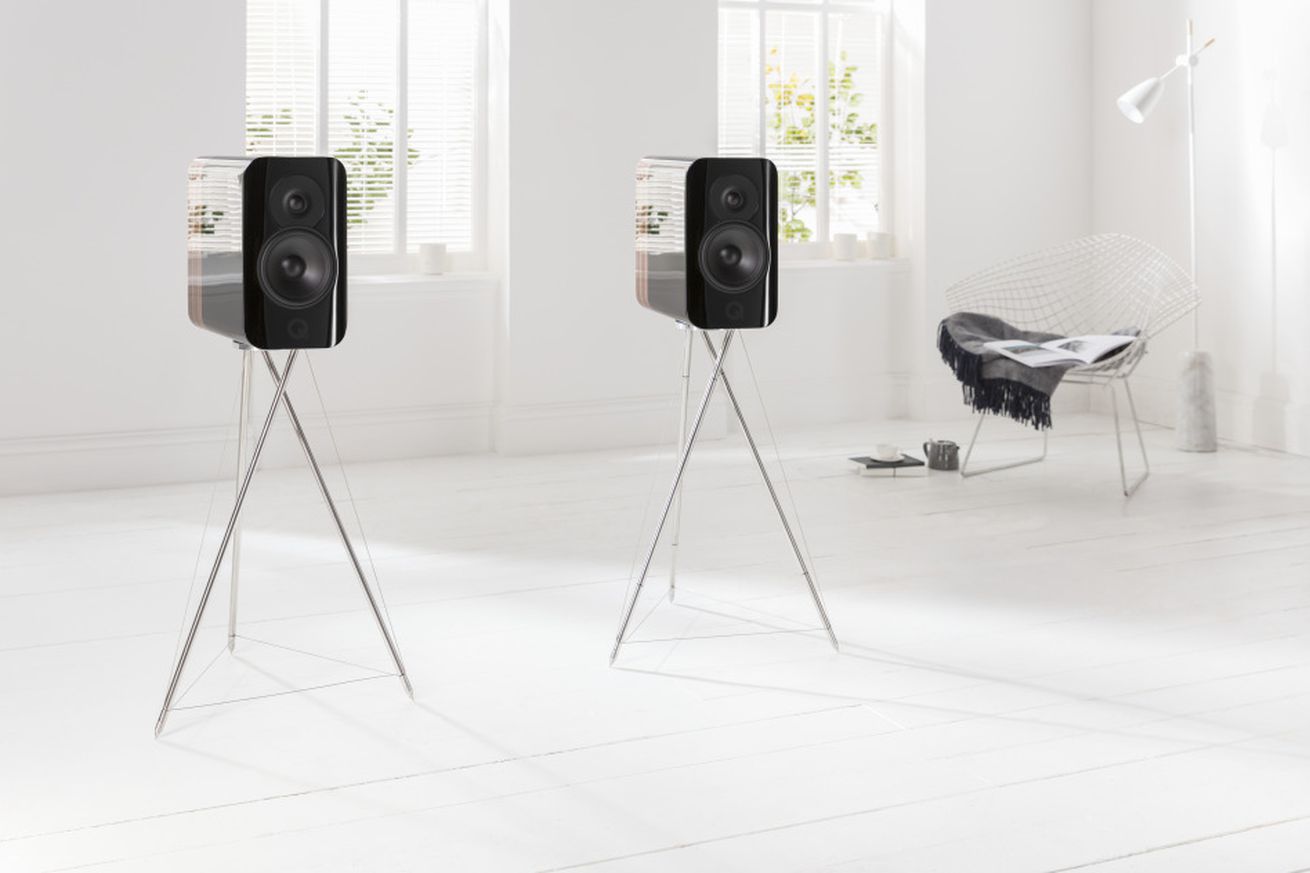
Q Acoustics is known for high-end audiophile speakers that cost thousands of dollars, and its newest release, the Concept 300, follows suit. But for once, it's not the speaker itself that's the star. Each Concept 300 speaker comes with an aluminum tripod stand that is an exceptional example of form meets function.

The Tensegrity stand — named after the structural principle — is a spindly, industrial-meets-mid-century tripod that's made of aluminum tubes and stainless-steel cables. The idea of tensegrity is that of floating compression — the integrity of the structure comes not from the tripod alone, but the balance of tension (cables) and compression (tubes). This creates a self-supporting structure that is not subject to bending force...

Continue reading…

Energizer says it’s making phones with pop-up cameras, 18,000mAh batteries, and foldable displays

Posted: 01 Feb 2019 02:19 PM PST

As if the simple fact that Energizer sells smartphones wasn't surprising enough, the company is unveiling 26 new models at Mobile World Congress this year, with flagship features like pop-up cameras, a massive 18,000mAh battery, and a foldable display. And before you get any ideas, just know that these are all separate phones (though a phone with all three of these features would truly be a sight to behold). In fact, the silhouettes of the pop-up camera models make the phones look like giant batteries, which is weirdly appropriate.

According to 9to5Google, the phones will be part of four lines: Power Max, Ultimate, Energy, and Hardcase. The bulk of the 26 new models will be basic feature phones, part of the Energy and Hardcase lines. The...

Continue reading…

Comedians are coming for one of Instagram’s biggest joke aggregators

Posted: 01 Feb 2019 02:15 PM PST

Comedians have started a campaign to take down Fuckjerry, one of Instagram's biggest joke aggregators. The Instagram account, run primarily by Elliot Tebele with contribution from others at Jerry Media, posts jokes and memes from around the internet — while profiting off sponsored posts sent to the 14.3 million followers those jokes have attracted.

This week, comedians on Instagram and Twitter are speaking out against Fuckjerry with the hashtag #fuckfuckjerry and encouraging people to unfollow the account. The campaign comes in light of renewed attention on Jerry Media, from its recent role in documenting — and working for — Fyre Fest, to a recent Vulture article about how it profits off other peoples' jokes.

Here's what's happening and...

Continue reading…

Snopes says nope to Facebook’s money and leaves fact-checking program

Posted: 01 Feb 2019 01:17 PM PST

Snopes will no longer partner with Facebook as part of the social network's fact-checking initiative. Facebook began the effort at the end of 2016 — after the US presidential election and as Russia's social media meddling came into focus — in the hopes of battling back misinformation on the platform. Using data from its fact-checking partners, Facebook would try to inform users about questionable or false "news" stories shared by their friends. Snopes was joined by ABC News, The Associated Press, FactCheck.org, and PolitiFact as fact-checkers.

But Snopes says it is now "evaluating the ramifications and costs of providing third-party fact-checking services, and we want to determine with certainty that our efforts to aid any particular...

Continue reading…

What we learned from net neutrality’s big day in court

Posted: 01 Feb 2019 01:08 PM PST

Over five hours in a Washington, DC courtroom today, a coalition of net neutrality defenders squared off with the Federal Communications Commission, as the two sides made their case for and against the internet regulations.

The dispute is one of the most high-profile legal battles in the history of the internet, but there was no immediate sign of which way the three-judge panel overseeing the case would decide. By turns, both sides faced some sharp questioning from the judges for the US Court of Appeals for the District of Columbia.

The petitioners in the case argued that the FCC's repeal was unlawful in several ways. The FCC failed in its analysis of the internet service market, failed to consider public safety, should not have blocked...

Continue reading…

Roku TV wireless speakers are $50 off

Posted: 01 Feb 2019 01:05 PM PST

The Roku TV wireless speakers are $150 directly from Roku, which is $50 less than they usually cost. These are a great option if you're looking to improve your Roku TV's sound performance without spending too much money. As Verge editor Chris Welch discovered during his review, these speakers are incredibly simple to set up, too. All you need to do is plug each one into its own power outlet, then follow some on-screen prompts. Your Roku TV's built-in Wi-Fi will handle the rest.

This is the first time since Black Friday 2018 that the Roku TV wireless speakers have seen a major discount. If you're interested in these speakers, you'll have until February 3rd to take advantage of the deal. The main thing to keep in mind is that they'll only...

Continue reading…

Drones are already being confiscated near the Super Bowl

Posted: 01 Feb 2019 01:02 PM PST

On Sunday night, the Super Bowl might play host to a matchup between two high-flying acts that have nothing to do with football: drones and drone hunters. The Federal Bureau of Investigation said on Friday that security officials at Atlanta's Mercedes-Benz Stadium are already "inundated" with drones, and the agency has confiscated at least six so far.

The Federal Aviation Administration's temporary flight restriction around the stadium went into effect on Friday. It states that drones aren't allowed within one nautical mile in all directions up to 1,000 feet. On game day, the restriction increases to 30 nautical miles and 17,999 feet.

The pilots could face "significant fine and/or jail time" for violating...

Continue reading…

YouTube wants ‘dislike mobs’ to stop weaponizing the dislike button

Posted: 01 Feb 2019 12:20 PM PST

YouTube is no stranger to viewers weaponizing the dislike button, as seen by the company's recent Rewind video, but the product development team is working on a way to tackle the issue. Tom Leung, director of project management at YouTube, addressed the issue of "dislike mobs" in a recent issue of Creator Insider, YouTube's corporate series for creators.

"Dislike mobs" are the YouTube equivalent to review bombings on Steam — a group of people who are upset with a certain creator or game decide to execute an organized attack and downvote or negatively review a game or video into oblivion. It's an issue on YouTube as well, and one that creators have spoken out against many times in the past. Reports have suggested that a video with a high...

Continue reading…

Netflix’s Velvet Buzzsaw feels like Robert Altman’s Final Destination

Posted: 01 Feb 2019 12:12 PM PST

Welcome to Cheat Sheet, our brief breakdown-style reviews of festival films, VR previews, and other special event releases. This review comes from the 2019 Sundance Film Festival.

Horror films often pack their character rosters with terrible people, as a hedge against the audience feeling too much empathy as those characters get bumped off one by one. Viewers might find horror a little less cathartic and a little more depressing if they actually liked every eviscerated victim on-screen, and were fruitlessly rooting for them, then watching them ignominiously lose their lives. So in horror movies with any significant body count (unlike, something like Get Out or The Visit, which focus on one or two desperate, sympathetic protagonists),...

Continue reading…


Speed Up Your Web Browsing With These Browser Extensions

Posted: 01 Feb 2019 06:05 AM PST

You probably spend a lot of your computing time traveling across the web in your browser of choice, which means any ways of speeding up that browser time is going to add a serious boost to your productivity. Install these extensions to supercharge your browsing and get everything done on the web that little bit…

Read more...