Cap-and-gown graduation ceremonies are a tradition that go back to the Middle Ages. Even though times (and styles) have changed considerably since then, it's still important to cut a handsome image when you're walking across the stage. Donning a graduation cap may seem simple, but there's a right and a wrong way to do it that may vary depending on your school, field of study or graduate level. No matter what sort of cap you're wearing, you'll want to make sure that it fits properly and is lined up in all the right places, and that you keep it in pristine condition until it's time to receive your diploma.
Arrange the cap so that the point is in front. The mortarboard (the square piece on the crown of the cap) is meant to be worn offset in a diamond shape. The front and back of the cap will usually be indicated by the design of the headpiece—look for the slight taper in the forehead area and the elastic band in the rear.[1]
Situate the cap so that the front corner of the mortarboard is centered on your forehead.[2]
If you're still not sure which way it goes, take a look inside the brim. The manufacturer often includes basic directions for how to wear the cap properly.
Make sure the cap sits evenly. Once the cap is on your head, the mortarboard should be flat and level with the ground. If it's not, you may need to tilt it slightly to straighten it out. Double check that the band of the headpiece is symmetrical and comes to a stop about an inch above your eyebrows.[3]
Don't push the cap too far forward or back on your head or let it lean to one side.[4]
To test whether your cap is level, try placing a lightweight object on top and see if it stays in place.
Attach the tassel. If the cap doesn't have a fixed tassel, or it doesn't arrive preassembled, you'll need to put it on yourself. To do this, simply loop the circular end of the tassel over the raised button in the center of the mortarboard. It should be able to slide freely around the button without coming loose.[5]
Give the tassel a couple gentle tugs to make sure it's secure.
Position the tassel correctly. At the beginning of the ceremony, the tassel should fall on the right side of the cap (unless otherwise specified). Once everyone in the class has been announced, you and your fellow grads will flip it around to the left side, signifying your transition from student to graduate.[6]
Some schools and programs may do things a little differently. Be sure that you're clear about your school's established practices prior to the big day.
Keep the tassel out of your line of sight and resist the urge to mess with it as much as possible.
Leave your cap on for the duration of the ceremony. Once you've got your cap and gown on, try not to fidget with them too much. They may not be the most comfortable, but you'll only have to wear them for a couple of hours.When it comes time to remove your cap, do it in style—new graduates traditionally toss their caps into the air as a celebratory gesture when the ceremony draws to a close.
Resist the urge to remove your cap for any reason once the ceremony is underway, unless it's for the singing of the National Anthem.[7]
You can hold onto your cap if you'd rather be wearing it when it comes time to take pictures. In fact, this will definitely be a good idea if your regalia is rented!
Order your cap and gown in the right size. Use the size measurements provided by the supplier to ensure that your graduation regalia will fit the way it's supposed to. The cap itself should be snug, but not too tight. If it keeps slipping out of place, it's most likely too big, whereas if it's cutting off your circulation you might benefit from going up a size.[8]
Get a more accurate estimate by measuring your crown with a tape measure and comparing that measurement to the available sizing options.[9]
Return poorly-fitting caps and gowns right away to give yourself plenty of time to have them exchanged for the correct size.
Give the cap a trial run. It's a good idea to try your cap and gown on a time or two before the actual ceremony so you can get an idea of how the completed ensemble will look together. This will also give you a chance to make any necessary last minute adjustments.[10]
The more times you wear the cap, the more comfortable you'll feel once it's time to take to the stage.
Style your hair to fit under the cap. Most guys and ladies with shorter hair will be able to get away with minimal styling. Those with longer locks can experiment with ponytails, braids or straightened looks that draw the eye to the neck and shoulders. The key is to keep the hair smoothed away from the crown to give the cap the space it needs to rest comfortably.[11]
If you'd prefer to show off a more elegant style, try curling the ends or tucking it up so that it's just visible beneath the cap.
It's typically wise to avoid up-dos and styles with too much volume.
Save the cap for last. Wait until you're wearing your gown, stole and any other components to put on the cap. That way, you can focus your attention on fixing your hair and makeup without worrying about messing them up later. The cap should be the final addition to your graduation regalia.[12]
Some gowns and hoods are designed to be slipped over your head, which can be tricky if you've already got your cap on.
Decorate your cap. Some schools may allow you to add small embellishments to your graduation cap to express your personality and help you stand out from the crowd. Tack on a few buttons or a pendant for a modest injection of personality, or break out the paint pens, glitter and fabric letters to really make a statement. This is an important day in your life, so it's important that you enjoy yourself while you're receiving your honors.[13]
Use paint, fabric and other accessories in your school's colors.
Spell out a special message or quote related to graduation. Even if your classmates can't see it, the audience will.[14]
Be sure to run your decorating ideas by the principal or dean before you making any drastic modifications to your regalia.
Put the cap away until you need it. The best way to protect your graduation cap from damage is to not take it out any more often than you have to. Stash the cap in the box it was packaged in when it's not in use and set it on the top shelf of a closet where it won't get crushed or bent. This will keep it from being exposed to dust, sunlight and moisture, as well as other potential dangers like pets or small children.
Handle the mortarboard carefully. Always grip it lightly by the edges whenever you're picking it up or setting it down.
As soon as you receive your cap and gown, place them on a hanger to work out the wrinkles.[15]
Brush out the tassel. As your cap gets moved around, the strands of the tassel may get hung up on one another. Run your fingers through the strands before putting on the cap to separate them and keep them looking neat and orderly.[16]
This should be done just before you put the cap on so you can walk down the aisle confident and tangle-free.
Keep your cap spotless. There will probably be no need to clean your cap prior to graduation, but if for some reason you must, do it with a gentle steaming or ironing. Never put the cap through the washing machine, have it dry cleaned or allow it to get wet, as this can easily ruin the fabric or cause it to lose its shape.[17]
Brush loose dust and dirt from your cap and gown by hand rather than using an implement that may damage the material.
Don't leave your cap sitting out where it may get something spilled on it.
Use a couple clips or bobby pins to prevent the cap from sliding around or being carried off by a gust of wind.
A small amount of low-hold hair styling product can keep a tight cap from wreaking havoc on your hair before you take pictures or go out for a celebratory dinner.
If your cap or gown needs to be ironed due to wrinkling, try placing a pillowcase between the gown and iron, then ironing it on low heat.
A bad sunburn can be painful, irritating, and tough to get rid of quickly. We've looked into it for you, and the very best thing you can do to diminish the intense redness is to take actions to properly heal and conceal your skin. After this, ease your discomfort with medication, cool temperatures, and other remedies. Prevent yourself from burning next time by protecting your skin with sunscreen and protective clothing, and by practicing awareness.
Drink a lot of water. Try to drink at least 10 full glasses of water each day for a week after your sunburn. This will help your body to re-hydrate which will, in turn, aid in the healing process. Drinking water while you are out in the sun will also help you to avoid heatstroke and other heat-related medical conditions.[1]
At the same time, make sure to avoid consuming any alcohol during your recovery period. This will only dehydrate you and dry out your skin even more.[2]
Apply aloe vera. This is the traditional go-to remedy when dealing with a burn. The gel of the aloe vera plant has natural anti-inflammatory properties and can speed up the healing process if applied correctly. You can buy a store-brand aloe, but it is best to use the gel directly from a plant when possible.[3]
To remove the gel from a plant, break off a single full stem. Cut the stem open lengthwise. Open the stem and scrape out the gel using a spoon or your finger. Apply the gel to your skin between 2-3 times a day.[4]
For extra relief, you could also fill up an ice cube tray with aloe vera and freeze it, making aloe cubes that you can rub on your burn. (Wrap the cubes in a light hand towel before touching them to your skin). You can also apply aloe gel to your face in an overnight mask.[5]
Create a baking soda paste. Get out a small bowl and mix equal parts baking soda and cornstarch. Add cool water until it reaches a thick enough consistency to apply to your skin. Both of these primary ingredients may take some of the redness out the burned areas. Rinse the paste and reapply as needed to soothe your skin.[6]
Use witch hazel. You can use the leaves and bark of the witch hazel plant for medicinal purposes. The "tannins" contained in witch hazel may help to repel bacteria and promote healing. Look for a vial of witch hazel extract at your local natural foods store. Use a cotton ball to apply the extract to your skin.[7]
Apply apple cider vinegar to the area. You can fill up a bottle and spray the vinegar directly on your skin for relief. Or, you can soak cotton balls in vinegar and place them on your skin. Vinegar is a known anti-inflammatory, so it may speed up the healing process. You can also take a cool bath in vinegar. Fill the tub up with cool water and then 1 cup of vinegar. Relax in the tub for approximately 20min and then rinse off. Do this once a day for about three days. The cool water mixed with vinegar will pull the burning sensation of the heat out of your body, and make you feel cooler.[8]
Be aware that some people react badly to apple cider vinegar. It is a good idea to apply a small amount on the back of your hand, via a cotton ball, before putting it all over your body. This will allow you to watch your body's reaction on a small scale to make sure you will be okay.
Apply potato slices to the area. Many natural healers swear that potatoes can reduce pain and inflammation. Get a few potatoes and use a knife to cut them into thin slices. Then, place these slices on the burnt areas of your skin. Rotate the slices until you feel some relief.[9]
You can also dice or shred a potato and place it into a blender. Blend for a few pulses and then apply the resulting paste (being careful to include the potato juices) onto your skin.
Make sure to carefully wash the potatoes before slicing or dicing.
Apply live cultured yogurt. This one is a bit of a long-shot but, if nothing else, the cool temperature of the yogurt may soothe your skin. Get out a cup of plain, probiotic yogurt and apply a light coating to your burned skin using a cotton ball. Let the yogurt sit on your skin for around 5 minutes before wiping off with a clean damp towel.[10]
Wear loose and dark clothing. Light, cotton garments that fall away from the skin are your best options during your recovery period. These items will let your skin breathe, preventing stagnation and lessening the possibility of infection. Stick to darker colors as they will draw less attention to your skin. Avoid whites and neon colors as they will create contrast with the redness, making it more noticeable.[11]
Use make-up to cover the redness. Apply a green-tinted primer to the burned areas to counterbalance the appearance of redness. Don't apply blush as it will only increase the red look. Use a light hand with make-up, however, as you can run the risk of skin irritation.[12]
Take pain medication. As soon as you get out of the sun, take an over-the-counter (OTC) anti-inflammatory medication, such as Aspirin. Go ahead and ingest the highest recommended dose for at least the first 24 hours to kick-start the healing process. Keep taking the medication until the immediate discomfort from the burn has subsided.
No matter how much pain you feel, it is critical that you follow the dosage instructions for OTC or prescription pain medications. Taking more than the proper dosage can cause serious medical injuries, such as liver damage. Read the label carefully to determine how many pills to take and at what intervals.
Make sure that you are also aware of any possible pain medication side effects or drug interactions. These are often also listed on the bottle's label or you can contact your doctor with any questions. For example, people with bleeding issues are often advised to avoid consuming Aspirin.
You can also get a small bowl, drop one or two aspirin tablets into it, and crush them into a paste (adding a little water, if needed). Then, apply this paste to the most burned areas. Wipe off after a few minutes. However, for health safety reasons, do not crush and use more pills than the recommended dosage on the bottle or apply this paste while also taking a pain medication orally.[13]
Apply a cool cloth to the area. Pull out a soft cotton washcloth and dip it into cool, not cold, water. Wring it out slightly and then place it on your skin. Re-soak the cloth and repeat as necessary. You can also dip the cloth in whole cold milk. This will let you get the cooling benefits and the restorative effects of vitamin D.[14]
Take a cool bath. Run a bath for yourself using cool, not cold, water. Soak for a bit. For even more benefit, fill up a clean sock with 2 cups of uncooked oatmeal and tie it off at the end. Place the filled sock in the tub with you and squeeze it to release the juices. The oatmeal's polysaccharides will coat and calm your skin.[15]
You can also, of course, dump the raw oats directly into the tub with you, but expect more of a clean-up this way.
Resist the urge to scrub off with soap or a body cleanser while in the tub. This will only dry your skin out and extend the healing process.[16]
Soothe with cucumber. Add a bit of cucumber to your water for a relaxing way to hydrate. Place thin slices of cucumber on your burn. Or, blend cucumbers to create a mask that you can then apply to your face or elsewhere. All of these approaches will maximize the antioxidant properties found in cucumbers.[17]
Feel free to mix the cucumber paste with aloe vera gel for even more of a healing boost.
Drink some tea. Make yourself a cup of green tea. You can either drink the tea directly or dip some cotton balls into it and apply it to your skin. The antioxidants and anti-inflammatory properties of the tea may reduce redness and swelling, allowing your skin to heal.[18]
Avoid applying ice. It is very tempting to pluck a few cubes out of the freezer and place them directly onto your skin. Resist this urge as that type of extreme cold can actually damage your skin, even more, killing the skin cells in the process. Instead, if you really want to use ice, wrap the cubes in a soft, clean washcloth before touching them to your skin.
Do not pick at the affected area. Resist the urge to run your fingers over your skin, removing flakes as you go. Your dead skin will fall off in due time without your direct assistance. Forcibly exfoliating your skin too early can lead to scarring or infection. This is especially the case if you puncture any raised areas or sores.[19]
Once your skin has returned to a close-to-normal color and is pain-free then you can spend some time exfoliating it with a soft sponge or scrubber.
Consult with a doctor. Make an appointment to see a physician if your sunburn develops blisters or seems to be swelling. If you see any pus coming from the burned areas, it can be a sign of possible infection. You can also see a doctor if your burn is simply making you miserable and the home remedies seem to have no effect.[20]
Depending on your specific situation, your doctor will most likely give you a corticosteroid cream. They may also prescribe an antibiotic if your burn shows signs of infection.
Apply sunscreen before going out. Purchase a broad-spectrum (also called a full-spectrum) sunscreen that will block both UVA and UVB rays. Get a sunscreen with a sun protection factor (SPF) of at least 50, the higher the better. Then, apply the cream to your skin at least 20 minutes before heading outside. This allows the sunscreen to begin working before you are actually exposed to the sun, thus preventing burning.[21]
As you consider various sunscreen brands, consider what activities you'll be doing that will require protection. If you will be in the water, then you'll want a sunscreen that is water-resistant. If you are hiking, you may need a sunscreen that includes insect repellant.
Reapply sunscreen on a regular basis. You should aim to reapply your sunscreen at least every 90 minutes. This interval may need to be shortened if you are sweating heavily or spending time in the water. When you reapply, don't rush. Make sure to coat all exposed parts of your body.[22]
For each application you can estimate using a nickel-sized portion on your facial area and two shot glasses worth of lotion on your body.
Wear a hat. It is almost impossible to apply sunscreen to your scalp and that makes this area very susceptible to burning. To prevent a painful head burn, wear a solid hat when venturing outdoors for extended periods of time. This will also offer some protection for your face as well.[23]
Pay attention to your body's signals. Your body will often tell you when it has had enough of the sun. Pause in your activities for a moment and evaluate your condition. Does your skin feel overly warm? Are you starting to notice feelings of tightness? Are you experiencing any pain at this point? If you answer "yes" to any of these questions, head indoors.
Ask your friends to check you out. If you are outside with other people you can always ask them to look you over. However, the reflection from the sun on your skin can often mask the visual signs of a burn, so it may be difficult for them to accurately gauge if you are headed in that direction.
Be very careful when recovering. It can take up to six months for your skin to fully heal after a sunburn. If you are burned again during this interval, the healing process can come to a standstill. While you are healing, be careful with your body and limit your time in the sun.[24]
Over-the-counter moisturizers get a bad rap when it comes to burns. Buy a water-based moisturizer and then place it in the fridge to cool. Applying it to your burns should help a bit.
Be patient with the healing process. Most sunburns begin to visibly improve within a week or less.[25]
If you want to expedite the healing process, you might try LED laser therapy treatments. These applications promote healing and can be done immediately following a burn.[26]
Don't apply apple cider vinegar to your sunburn without first diluting it significantly with water. Pure apple cider vinegar will be far too acidic and cause further damage and additional pain.
If you are experiencing severe swelling, a high temperature, dizziness, nausea, or headaches along with your burn, then get medical attention immediately. You could be experiencing sun poisoning.[27]
Be aware that certain medications, such as particular antibiotics, can make you particularly susceptible to the sun's rays, potentially resulting in a sunburn.[28]
For a fun party treat with shocking color, make Blue Hawaiian jello shots. To quickly mix up these adult shots, dissolve berry blue jello in water and then add Blue Curaçao, Malibu Rum, and pineapple juice.[1] Pour the liquid into small cups and chill until they're set. For shots with distinctive blue and yellow layers, combine pineapple juice with vodka, gelatin, and Blue Curaçao. Once this layer is set, pour a mixture of gelatin, lemon syrup, and pineapple juice over it. Serve the layered shots once they're set.
Arrange 10 small cups on a baking sheet. Get out a rimmed baking sheet or tray and set it on your work surface. Place 10 2-ounce (59 ml) plastic soufflé on the tray.
Put the berry blue jello in a bowl and whisk in the boiling water. Open a 3-ounce (85 g) box of berry blue jello and pour it into a bowl. Slowly pour in of boiling water and whisk until the jello is dissolved.[4]
To make it easier to pour into the cups, you can whisk the mixture in a large heat-proof measuring cup.
Whisk in the Blue Curaçao, Malibu Rum, and pineapple juice. Pour of Blue Curaçao liquor, of Malibu Rum, and of chilled pineapple juice into the bowl. Whisk to combine the liquids.
Pour the liquid into the cups. Slowly pour enough of the liquid to fill each of the soufflé cups on the baking sheet. If you can't pour directly from the bowl, use a measuring cup to divide the liquid between the cups.
Chill the jello shots for at least 4 hours. Put the baking sheet with the shots in the refrigerator. Leave the jello shots for at least 4 hours so they set up.[5]
If you'd like to make the shots ahead of time, refrigerate them for up to 1 day.
Garnish the shots with pineapple wedges and maraschino cherries. Cut 10 canned or fresh pineapple wedges into bite-sized pieces and cut a slit into each. Push a bite-sized wedge onto the rim of each jello shot. Then top each shot with a maraschino cherry and serve them.
Garnish the shots just before serving because the cherries could discolor the shots over time.
Put of the juice and vodka into a pan. Pour of the strained pineapple juice into a saucepan and add of vodka. Stir to combine the liquids.
Sprinkle half of the gelatin over and let it sit for 1 to 2 minutes. Open a 0.25 (7 g) package of gelatin and sprinkle it over the liquids in the saucepan. Let the gelatin absorb the liquid for 1 to 2 minutes.
The gelatin will appear thick once it's absorbed some of the liquid.
Avoid stirring the gelatin as it hydrates.
Stir and cook the mixture over low heat for 5 minutes. Turn the burner to the lowest setting and begin stirring the gelatin mixture. Keep stirring as the gelatin heats and dissolves.
Avoid heating the gelatin over medium heat because it could cause some of the alcohol to evaporate.
Turn off the burner and stir in the Blue Curaçao and rum. Move the saucepan to a cold burner to stop the gelatin from cooking further. Stir in of Blue Curaçao liqueur and of white rum.
Pour the blue gelatin mixture into shot glasses. Place 18 to 24 2-ounce (59 ml) cups on a baking sheet. Divide the blue gelatin mixture between all of the cups. This will make a blue layer on the bottom of the shots.
To make a larger pan that you can cut into shots, get out a 9 x 5 (22 x 12 cm) loaf pan. Pour all of the blue gelatin mixture into the loaf pan.
Refrigerate the blue gelatin layer for at least 1 hour. Put the baking sheet with the shots into the refrigerator. Chill the jello for at least 1 hour so the blue layer sets up completely.
Mix the remaining juice and of lemon syrup in a saucepan. Pour the remaining of strained pineapple juice into a small saucepan. Stir in of lemon syrup until the liquids are combined.
If you don't have lemon syrup, mix of lemonade concentrate with of water and strain it.
Sprinkle the gelatin over the liquid and let it soak for 1 to 2 minutes. Open the remaining (0.25 or 7 g) envelope of gelatin and sprinkle it evenly over the liquid in the saucepan. Leave it to hydrate for 1 to 2 minutes.
Don't stir the gelatin as it hydrates or it could make lumps.
Stir and cook the yellow gelatin for 5 minutes over low heat. Turn the burner to the lowest setting and stir the gelatin constantly. Keep cooking the gelatin mixture until the gelatin dissolves.
Cool the yellow gelatin for 10 minutes and pour it into the shot cups. Turn off the burner and move the saucepan to a cold burner. Let the gelatin mixture cool for 10 minutes. Then take the cups with the blue gelatin out of the refrigerator and pour the yellow gelatin evenly over the blue layer.
If you're using the loaf pan, pour all of the yellow gelatin over the blue layer in the pan.
Refrigerate the jello for at least 2 hours. Put the baking sheet with the shots back in the refrigerator and chill them until they're completely set. If you'd like to make them ahead of time, refrigerate them overnight.
To serve the shots, remove them from the refrigerator just before you're ready to serve them. If you used the loaf pan, cut them into small cubes and serve them.
Em outubro do ano passado, o Google havia anunciado que planejava implementar algumas mudanças nas extensões do Chrome. Uma dessas alterações incluía limitar bloqueadores de propaganda. Os desenvolvedores que trabalham nessa área obviamente não ficaram muito satisfeitos, ameaçando inclusive tomar providências legais.
Apesar do descontentamento, parece que o Google manteve sua decisão e esclareceu alguns pontos de como será essa mudança. Segundo a empresa, o projeto, chamado Manifest V3, tem como objetivo oferecer mais privacidade e segurança aos usuários, além de melhorar a performance das extensões. Mas, para isso, a gigante de tecnologia vai limitar como essas extensões poderão examinar os sites.
Simeon Vincent, funcionário do Google, argumentou que o atual sistema de instalação de extensões permite que os desenvolvedores declarem que precisam acessar uma série de informações e o usuário deve escolher entre permitir esses acessos ou cancelar a instalação. Com a mudança, o usuário terá maior controle sobre essas permissões.
O Google ainda revelou que considera abrir uma exceção em relação a essas mudanças para usuários corporativos.
De acordo com o ZDNet, a mudança do API webRequest vai impedir que os adblockers interceptem requisitos da rede para modificar, redirecionar ou bloquear requisitos API. Assim, ele seria reduzido a uma função "observacional", tornando-se uma ferramenta de interações passivas em vez de ativas.
Desenvolvedores de extensões como uBlock e Ghostery insistem que a mudança será extremamente prejudicial aos bloqueadores e até mesmo para os usuários. Eles ainda acusam o Google de utilizar o discurso de que se preocupam com a privacidade dos usuários para justificar ações que garantem a dominação do mercado pela empresa.
Os Emirados Árabes Unidos são um dos estados mais avançados no quesito vigilância do século 21.
Uma das economias mais fortes do Oriente Médio, os EAU investiu pesadamente por anos para estar na crista da tecnologia de vigilância e repressão. O governo gastou milhões de dólares comprando e desenvolvendo capacidades de invasão digital que foram utilizados para atacar vítimas proeminentes como o ativista dos direitos humanos nascido nos EUA Ahmed Mansoor que agora está em uma prisão secreta por criticar o regime.
E qual seria o próximo passo da máquina de vigilância dos EAU? Para um vendedor sagaz a resposta é fácil: vigilância com reconhecimento facial.
E a titã tecnológica americana IBM, junto com as gigantes chinesas Huawei e Hikvision estão vendendo sistemas de vigilância biométrica para a polícia e agências de espionagem dos Emirados Árabes, de acordo com uma extensa reportagem do BuzzFeed.
A ditadura dos EAU é famosa pela opressão de dissidentes, violação dos direitos humanos, abuso de trabalhadores e migrantes. O país tem banido trabalhadores internacionais defensores dos direitos humanos e lutado contra a liberdade de expressão. Fora que os Emirados Árabes também são um regime autoritário e extremamente rico do Golfo Pérsico, o que o torna um baita cliente para empresas dispostas a fazer negócios com ditaduras.
Nos Estados Unidos, a vigilância com reconhecimento facial é ponto de séria controvérsia. São Francisco se tornou a primeira cidade americana a banir completamente o uso dessa tecnologia por entidades governamentais, apesar da resistência da polícia local. Pesquisadores apontaram problemas com vieses e, mais fundamentalmente, como o reconhecimento facial pode expandir os poderes a um escopo sem precedentes.
Para os fãs de longa data da IBM, notícias de que a empresa está aparentemente envolvida com ditaduras pode soar familiar. Certamente trará à memória as críticas que a companhia recebeu com um suposto envolvimento com os nazistas durante a Segunda Guerra Mundial.
“As autoridades dos EAU lançaram um ataque contínuo à liberdade de expressão e associação desde 2011″, diz a Human Rights Watch. “Os residentes dos EAU que falaram sobre questões de direitos humanos correm sérios riscos de detenção arbitrária, prisão e tortura. Muitos estão cumprindo longas penas de prisão ou deixaram o país sob pressão”.
Nenhuma das empresas envolvidas respondeu aos pedidos de comentário do Gizmodo. A IBM disse ao BuzzFeed que a empresa tem “processos robustos em vigor para garantir que os potenciais compromissos dos clientes sejam consistentes com os nossos valores, bem como com as leis locais e dos EUA”.
As leis locais de que estamos falando, é claro, permitem a repressão brutal da dissidência.
Os valores que constam no site da IBM falam menos sobre ética do que sobre vitórias nos negócios.
Grandes empresas de tecnologia americanas experimentaram recentemente uma onda de ativismo vinda de seus trabalhadores e até mesmo de alguns executivos que falaram sobre os riscos inerentes à vigilância de reconhecimento facial.
O presidente da Microsoft, Brad Smith, pediu a regulamentação federal de reconhecimento facial no ano passado e disse que se recusou a vender a tecnologia a pelo menos uma agência de aplicação da lei dos EUA. Outras empresas, incluindo a Amazon, também pediram regulamentação.
Trabalhadores da Amazon protestaram quando souberam que a empresa vende softwares de vigilância com reconhecimento facial à polícia. Na semana passada, especialistas foram a uma audiência no Congresso americano para expor as armadilhas e perigos da tecnologia.
Enquanto o ruído em torno de vigilância de reconhecimento facial vai esquentando, a IBM se mantém silenciosa. Quando ela diz alguma coisa, está tentando desviar do problema.
A IBM alegou ao BuzzFeed que sua plataforma PowerAI Vision não poderia “reconhecer rostos individuais”, como a reportagem colocava, e apenas identificar “objetos” em vídeo. Porém, no próprio site da IBM é dito que a tecnologia pode ser utilizada não apenas para reconhecimento de rostos, mas também para análise de sentimentos. “Demonstrações do produto mostram rótulos em objetos e seres humanos”, escreveu o BuzzFeed.
Existe um segredo por trás de todos os benefícios das redes 5G que estão, aos poucos, começando a funcionar ao redor do mundo: toda essa velocidade extra e banda irão tornar muito difícil não estourar os pacotes de dados, como a BBC descobriu recentemente durante sua primeira transmissão ao vivo usando 5G.
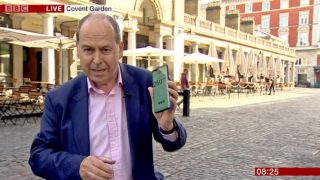
Hoje, a EE, uma operadora do Reino Unido, lançou sua rede 5G em seis cidades do país, incluindo Belfast, Birmingham, Cardiff, Edimburgo, Londres e Manchester. Para ajudar a ilustrar uma das maiores vantagens do 5G em relação a outras gerações de redes móveis — principalmente a habilidade de entregar velocidades de banda larga sem usar fios –, a BBC colocou o repórter Rory Cellan-Jones para fazer uma reportagem ao vivo durante o programa BBC Breakfast que seria transmitida pela rede 5G da EE.
Tradução: A primeira rede 5G comercial da Grã-Bretanha foi lançada hoje e estamos a utilizando para a nossa transmissão. Momento histórico @BBCNews @BBCRoryCJ @BBCBreakfast
Você pode assistir ao trecho do programa aqui. A qualidade da imagem é excelente, sem interferências de compressão, engasgos ou congelamentos aleatórios que acontecem com frequência quando transmissões ao vivo são feitas via redes 4G ou 3G. Mas a primeira rede 5G da EE não é perfeita. Enquanto testavam um dos primeiros smartphones 5G disponíveis no mercado atualmente, Jones descobriu que a velocidade aumentava ou diminuía dependendo de onde ele ficava — um problema que deve ser aliviado depois que as torres 5G se tornem mais predominantes e ofereçam cobertura ampla e confiável.
No entanto, o quadro do BBC Breakfast foi adiado em 15 minutos quando o equipamento de celular (oferecido pela Huawei) que estavam usando para fazer a transmissão parou de funcionar repentinamente. Mas não era um problema com a rede 5G em si; o chip SIM utilizado para a transmissão ao vivo simplesmente tinha atingido o limite de dados, o que será um problema que os usuários enfrentarão quando inevitavelmente começarem a assistir filmes 4K na Netflix pelo smartphone enquanto vão para o trabalho.
As operadoras já estão cobrando valores adicionais para permitir que os smartphones atuais utilizem as redes 5G. Prepare-se para contas de celular ainda mais caras, principalmente com um consumo maior de dados.
Uma equipe internacional de astrônomos relatou a descoberta de um planeta semelhante a Netuno localizado a cerca de 920 anos-luz da Terra. Apelidado de “Planeta Proibido” pelos pesquisadores, este objeto celestial está preso a uma órbita estranhamente próxima com a estrela hospedeira em uma configuração raramente vista.
Uma nova pesquisa publicada na quarta-feira (29) na Monthly Notices da Royal Astronomical Society descreve a descoberta de um planeta parecido com Netuno que é tão próximo de sua estrela hospedeira que uma única órbita leva apenas 1,34 dias. Um planeta semelhante a Netuno nunca foi encontrado tão perto de sua estrela hospedeira. De fato, os astrônomos até inventaram um termo, o “deserto de Netuno”, para descrever essa zona estelar tão próxima.
Ao contrário de planetas rochosos pequenos e resistentes ou Jupiteres Quentes gigantes, os planetas semelhantes a Netuno não deveriam existir a uma distância tão próxima, já que a estrela hospedeira queimaria o objeto de tamanho intermediário até seu núcleo. Mas esse novo exoplaneta (planeta que orbita outra estrela que não seja o Sol) está desafiando essas expectativas.
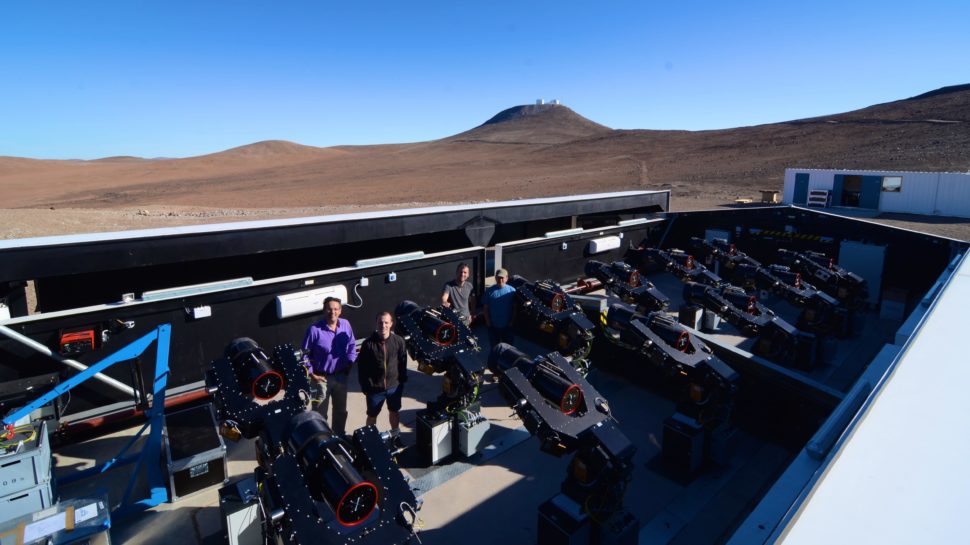
Mais formalmente, o exoplaneta recebeu a designação NGTS-4b. Ele foi descoberto pelo Next Generation Transit Survey (NGTS) – um telescópio terrestre no Paranal Observatory da European Southern Observatory, no Deserto do Atacama, no Chile.
Astrônomos da Universidade de Warwick na Next Generation Transit Survey (NGTS) no deserto do Atacama, no Chile. Crédito: Universidade de Warwick
Uma equipe liderada pelo astrônomo Richard West, da Universidade de Warwick, usou o método NGTS testado e comprovado para detectar e caracterizar o orbe distante. Este exoplaneta, que é cerca de 20% menor que Netuno e aproximadamente três vezes maior que a Terra, foi avistado quando se movia entre nós e sua estrela-mãe, resultando em um breve, mas periódico, escurecimento da luz da estrela.
Incrivelmente, eles calcularam que o brilho da estrela diminuiu em menos de 0,2% — algo que nenhum telescópio terrestre detectou antes, de acordo com um comunicado divulgado pela Universidade de Warwick.
Mas essa não é a única conquista pioneira da NGTS. O breve período orbital do Planeta Proibido, de 1,34 dias, é o mais curto já detectado por um telescópio terrestre. É também o menor exoplaneta a ser descoberto a partir de um telescópio localizado no solo. Nada mal para uma única descoberta.
Sem mencionar toda a questão do “deserto de Netuno”.
“O termo ‘deserto de Netuno’ veio da observação de que havia poucos planetas de massa intermediária em períodos [orbitais] muito curtos”, explicou Coel Hellier, astrônomo da Universidade de Keele que não participou do novo estudo, ao Gizmodo.
Anteriormente, os astrônomos descobriram planetas do tamanho de Netuno com períodos orbitais tão curtos quanto 5,44 dias (WASP-166b) e 4,23 dias (HAT-P-26b). Já os períodos orbitais entre um a quatro dias — o deserto neptuniano de curto período – -nem tanto.
A razão atribuída, explicou Hellier, é que planetas intermediários (isto é, grandes planetas de massa parecida com a de ‘Netuno’ e baixa densidade) são queimados pela radiação que sai de sua estrela. Os planetas de massa próxima à de Júpiter são capazes de sobreviver porque a maior massa e gravidade permitem que eles mantenham sua atmosfera, enquanto os planetas menores e rochosos são muito mais densos e menos suscetíveis a serem "fervidos", disse Hellier.
Quanto ao nome "Planeta Proibido", Hellier disse que a descoberta desse exoplaneta claramente desqualifica seu status de "proibido" ou impossível, já que ele obviamente existe. A explicação mais provável para a NGTS-4b, ele disse, é que ele chegou recentemente ao seu local atual, e sua atmosfera não teve tempo suficiente para queimar.
“Este planeta não tem massa suficiente para manter sua atmosfera, dado o calor intenso de estar tão perto de sua estrela”, disse Hellier ao Gizmodo. "Isso significa que provavelmente ele nasceu muito mais longe de sua estrela e se mudou para sua atual órbita de curto período apenas recentemente. Todo o crédito vai para a equipe do NGTS por encontrar um planeta diferente dos encontrados anteriormente por estudos similares".
De fato, este exoplaneta pode ser um bom exemplo da hipótese em desenvolvimento sobre a migração planetária. O NGTS-4b provavelmente se formou nos confins externos desse sistema planetário, mas se aproximou de sua estrela hospedeira, encontrando-se eventualmente em sua atual e perigosa posição orbital. Os autores do novo estudo disseram que esta é uma possibilidade distinta, mas ofereceram um segundo cenário: o NGTS-4b já foi extraordinariamente grande.
A astrônoma Hannah Wakeford, do Instituto de Ciência de Telescópio Espacial em Baltimore, não envolvido com o novo estudo, disse que este planeta provavelmente já foi muito maior do que é agora, e sua proximidade com a estrela está fazendo com que a sua atmosfera seja extinta. Consequentemente, o NGTS-4b está ficando menor e mais denso ao longo do tempo, à medida que a massa é dominada pela massa do núcleo e não pela massa atmosférica.
“Uma forma de testar essa hipótese é olhar para o trânsito planetário no [espectro] ultravioleta em busca de vestígios de vazamento de hidrogênio da atmosfera”, disse Wakeford ao Gizmodo. "Isso mostraria então que este planeta é como muitos dos outros […] exoplanetas encontrados no deserto de Netuno, e sugere que com o tempo a massa diminuirá de tal forma que se ele se tornará parte do grupo de planetas abaixo da classificação do deserto que perderam toda a sua atmosfera".
No futuro, West e seus colegas planejam examinar os dados para ver se algum objeto semelhante pode ser encontrado no deserto de Netuno. Talvez “o deserto seja mais verde do que se pensava”, disse ele no comunicado de Warwick.
Em quase todos os sentidos, 2018 foi um ano bem bom para a Motorola e sua empresa-mãe Lenovo. A receita total atingiu US$ 51 bilhões (crescimento de 12,5% ano a ano), e a Motorola em si voltou a dar lucros na segunda metade de 2018. Com o Moto Z4, a fabricante espera continuar esse sucesso com um dispositivo que oferece características de celular de ponta — incluindo uma entrada para fones de ouvidos, os Moto Mods e um preço mais camarada.
Não dá para chamar o aparelho de topo de linha. O preço sugerido é US$ 500 (R$ 1.984, na cotação atual) e suas especificações incluem um processador Qualcomm Snapdragon 675 e 4 GB de RAM. Portanto, ele não foi projetado para competir com celulares como o Galaxy S10 e nem mesmo com o S10e. Na verdade, estamos olhando para um aparelho de gama média, feito para competir com modelos como o Pixel 3a que sai por US$ 400 ou o OnePlus 6T lançado no ano passado.
Foto: Sam Rutherford (Gizmodo)
Dito isso, o Z4 ainda tem diversas características premium, incluindo uma tela OLED de 6,4 polegadas com resolução FullHD+, 128 GB de armazenamento base (com slot para microSD), um leitor de impressões digitais debaixo da tela e uma traseira de vidro parecida com a das gerações anteriores desse modelo. Além disso, o Z4 possui suporte aos módulos intercambiáveis de toda a linha.
O suporte para os Moto Mods não é uma grande surpresa, já que a companhia afirma que os donos de Moto Z que entram no sistema de módulos estão mais satisfeitos do que aqueles que possuem só o celular. No entanto, a empresa já cumpriu com sua promessa de três anos de comprometimento com esses acessórios no lançamento do Z3 — e não dá para saber o que virá no futuro.
Além disso, embora o Moto Mod 5G tenha começado a ser vendido nos Estados Unidos neste ano (e adiciona suporte à rede de nova geração dos clientes da operadora Verizon), esse é o primeiro smartphone da linha Z que não chega com novos acessórios em seu lançamento.
Mas vamos deixar os módulos de lado, já que a grande surpresa do Z4 é o retorno da entrada para fones de ouvido. Essa ressurreição marca a primeira vez que uma fabricante traz de volta a característica, um fato que parece ainda mais marcante quando lembramos que a Motorola a abandonou há mais de três anos com o lançamento do Moto Z original.
De acordo com Doug Michau, diretor executivo de operações de produto da Motorola para América do Norte, o motivo por trás disso foi simples: reclamações de usuários. Isso porque, embora as pesquisas com consumidores apontavam uma grande satisfação com os Moto Z anteriores, a companhia continuava recebendo um feedback negativo sobre a ausência da entrada tradicional para fones — era um dos itens de mais frustração. Então a Motorola ouviu seus clientes e adicionou uma porta de 3,5mm ao aparelho.
Fora isso, o Moto Z4 tem um nanorevestimento para protegê-lo da água em situações menos críticas. É aquela coisa: não dá para jogar ele na piscina, afinal ele não tem certificação oficial de resistência à água. E ao contrário de diversos smartphones de ponta lançados hoje em dia, o modelo não possui suporte a carregamento sem fio (embora exista um módulo para isso).
Outra escolha incomum da Motorola foi deixar o aparelho com uma única câmera na traseira, embora o seu Moto G7 tenha dois sensores. A Motorola diz que fez isso para evitar complicações desnecessárias no design do celular e focar na câmera principal com um sensor de maior resolução. E com uma câmera de 48 megapixels na traseira (junto com um sensor de 25 megapixels para selfie), a Motorola parece ter alcançado seu objetivo.
Tanto a câmera traseira quanto a frontal utilizam uma técnica chamada combinação de pixels que junta quatro pixels do sensor da câmera em um pixel maior. Isso diminui a resolução geral da foto, mas aumenta a sensibilidade à luz, que é algo muito valioso em situações com pouca iluminação.
A Motorola não parou por aí e seguiu os passos de Google, Huawei, Samsung e outros, dando ao Z4 um modo dedicado a cenas com baixa iluminação, chamado Visão Noturna. E mesmo sem câmeras secundárias, o aparelho é capaz de fazer fotos no estilo retrato, com fundos borrados.
Foto: Sam Rutherford (Gizmodo)
Estou bem curioso para ver como o Modo Noturno da Motorola se compara com o que vimos em celulares mais caros. No final das contas, a maior parte do apelo do Z4 continua sendo os seus módulos e o valor disso vai variar de usuário para usuário.
O Moto Z4 ainda não tem data para ser lançado no Brasil. O último modelo da linha Z lançado no Brasil foi o Moto Z3 Play, com preço sugerido de R$ 2.299 — uma versão mais potente com 6 GB de RAM chegou custando R$ 2.699.
Um dia após a medida provisória que recria a Autoridade Nacional de Proteção de Dados (ANPD) ser aprovada na Câmara dos Deputados, o texto também foi apreciado no Senado Federal nesta quarta-feira (29). A matéria agora segue para receber a sanção do presidente Jair Bolsonaro.
A Autoridade Nacional de Proteção de Dados é o órgão competente proposto na Lei Geral de Proteção de Dados Pessoais para criar uma política nacional para o assunto, fiscalizar o cumprimento da lei e aplicar sanções, entre outras atribuições.
Ao sancionar o Projeto de Lei da Câmara 53/2018, o então presidente Michel Temer vetou a criação da entidade. Uma medida provisória promulgada pelo próprio Temer naquele mesmo ano recriava a ANPD. Ela foi convertida em projeto de lei com algumas alterações pelo deputado federal Orlando Silva (PCdoB-SP).
A MP com os destaques propostos pelo deputado Orlando Silva muda algumas regras da Lei Geral de Proteção de Dados Pessoais. Compartilhamento de dados sensíveis, exceções na transferência de dados das bases do poder público para entidades privadas e tratamento de dados para determinados fins, por exemplo, foram alterados. Nós detalhamos estas mudanças nesta quarta-feira, em nosso texto sobre a aprovação da matéria na Câmara.
A aprovação rápida do projeto no Senado tem explicação: a matéria precisava ser apreciada até dia 3 de junho e, caso não fosse, perderia a validade. O texto também define agosto de 2020 como início da vigência das novas regras de proteção de dados pessoais.
Pessoal, eu tenho ótimas notícias se você é um motorista e más notícias se você é um policial: o Google confirmou que está lançando um novo recurso capaz de identificar radares de trânsito e limites de velocidade em mais de 40 países no Maps, incluindo o Brasil.
A empresa confirmou a notícia ao TechCrunch após relatos internacionais de usuários que perceberam a novidade e começaram a comentar no Reddit nas últimas semanas.
O Google Maps passou a exibir os alertas para alguns usuários em janeiro e, em março, os alertas de radares começaram a atingir mais pessoas. Agora, parece que a empresa está se comprometendo com os recursos que não estavam disponíveis anteriormente em todos os mercados internacionais do Google. (Como observou o TechCrunch, a falta de comunicação oficial sobre a novidade criou certa confusão em relação a onde ela estava disponível).
Os recursos são ótimos, mas se o aplicativo de navegação do Google, o Waze, indica alguma coisa é que a gigante de tecnologia pode enfrentar algumas aversões judiciais. No início deste ano, a CBS New York obteve uma carta de cessação e desistência enviada pela polícia de Nova York ao Google sobre os alertas do Waze para os pontos de fiscalização, a famosa blitz. Essa carta, que pode ser lida na íntegra aqui, afirma que o compartilhamento de informações sobre os pontos de fiscalização com os usuários do aplicativo “é irresponsável, pois serve apenas para ajudar motoristas embriagados e sem condições de conduzir a evitar essas fiscalizações, e incentivar a direção imprudente”.
Na época, um porta-voz do Google disse ao Gizmodo em um comunicado que a empresa “acredita que informar os motoristas sobre os radares de velocidade permite que eles sejam mais cuidadosos e tomem decisões mais seguras quando estão na estrada”. O Google agora está tornando esses alertas acessíveis para seus usuários no iOS e no Android. De acordo com o TechCrunch, o Google utiliza “fontes oficiais” e relatos dos usuários para enviar alertas.
Os alertas de radares de velocidade fazem parte de um conjunto de outros recursos lançados no Google Maps nos últimos meses. Em outubro, a empresa também introduziu recursos para ajudar os passageiros a planejarem suas viagens com atualizações em tempo real sobre transporte público e trânsito.
Aqui no Brasil, a atualização já está disponível, mas está sendo liberada gradualmente aos usuários.
Nesta quarta-feira (29), policiais de Londres foram chamados para investigar um "possível dispositivo explosivo", que teria sido carregado pela água até às margens do rio Tâmisa na região leste da cidade.
O grande objeto redondo tinha um tom enferrujado e escuro, como um explosivo de guerra antigo que oxidou ou foi coberto por algas durante décadas.
Mas, quando os policiais chegaram ao local, eles descobriram que o objeto era simplesmente uma "bola de Natal de glitter gigante".
Officers were called to Wapping to investigate a possible unexploded device that had been washed up on the shore. Luckily, upon closer inspection, it is a giant glittery Christmas bauble! pic.twitter.com/L6mCzr4Gjk
Tradução: Policiais foram chamados a Wapping para investigar um possível dispositivo explosivo que foi levado até à margem. Felizmente, após uma inspeção detalhada, descobriu-se que é uma bola de Natal de glitter gigante!
Além de o ornamento, de fato, se parecer com uma bomba (especialmente se você não olhar de perto a parte do gancho), é compreensível que o indivíduo que alertou a polícia estava vigilante.
Na semana passada, foi encontrada uma bomba que parecia ser da Segunda Guerra Mundial em um terreno próximo a um outro trecho do Tâmisa. Autoridades evacuaram milhares de residentes locais e fecharam escolas próximas e a Kingston University.
Tradução: Ok, aqui está o que vocês estavam esperando. O "primeiro" vídeo do real impacto da "bomba".
O susto da bomba desta semana teve um impacto significantemente menor, mas espero que quem tenha organizado a festa de Natal gigante na área tenha sido avisado.
Se você quiser se conectar à internet em Cuba, atualmente, é necessário ir a um hotspot sancionado pelo governo, construir seu próprio hotspot ilícito utilizando roteadores ilegais, ou criar um hotspot com uma cara conexão 3G em seu celular. Mas isso deve mudar em breve, de acordo com a Associated Press.
O Ministro de Comunicação (Mincom) de Cuba anunciou na quarta-feira (29) que o governo vai permitir que as pessoas configurem sua própria rede Wi-Fi particular em suas casas. A companhia de telecomunicação estatal Etecsa, a única provedora de internet na ilha, vai continuar a operar sem competição, mas o país vai liberalizar políticas que proibiam a importação de roteadores para uso pessoal. As mudanças deverão ser implantadas oficialmente até julho deste ano.
Historicamente, Cuba tem uma das leis de internet mais restritivas do mundo, banindo qualquer site de notícias que critique o governo. Mas, nos últimos anos, tem ocorrido algumas mudanças lentas, mas contínuas, permitindo que as pessoas se conectem de uma maneira que antes não podiam. Os cubanos só tiveram acesso à internet móvel recentemente, em dezembro de 2018.
Conforme observado pelo site de notícias alemão DW, as mudanças em relação ao Wi-Fi privado podem, potencialmente, permitir também que cafés com internet privados operem também, embora isso seja apenas especulação por enquanto. Os cafés com internet operados pelo governo foram inaugurados no país em 2013, mas os altos custos ainda são um obstáculo para a maioria dos cubanos. Um pacote de dados de 600 megabytes da Etecsa custa em torno de US$ 7, o que é um valor alto considerando que a média salarial de Cuba é de apenas US$ 30 a US$ 50 por mês.
Ao anunciar as medidas, o Mincom afirmou que as mudanças iriam: "Contribuir para a computadorização da sociedade, o bem-estar dos cidadãos, a soberania do país e a prevenção contra os efeitos nocivos de radiação não-ionizante".
O Google tentou estabelecer uma presença em Cuba em 2014, mesmo antes do ex-presidente Barack Obama tentar normalizar as relações com o país comunista. Mas Cuba tem se mostrado hesitante em deixar muitos estrangeiros controlarem sua infraestrutura de informação – talvez com bons motivos. Os EUA tentaram criar seu próprio "Twitter cubano" contra o governo de 2009 a 2012 com a rede social ZunZuneo, que funcionava com mensagens de texto. ZunZuneo é uma gíria cubana para o som de um beija-flor (tweet). O objetivo era criar artificialmente uma revolta popular contra o governo, que obviamente falhou.
O programa, operado pela Agência de Desenvolvimento Internacional dos Estados Unidos (USAID, em inglês) foi encerrado, mas apenas porque o esquema foi denunciado por um repórter da Associated Press em 2014. O Google assinou um acordo em março para criar sua própria conexão de internet em Cuba, embora os detalhes ainda não tenham sido definidos.
O Google não respondeu imediatamente ao pedido de comentários do Gizmodo.
O governo chinês está dando sinais de que está pronto para usar os metais de terras raras como uma barganha na guerra comercial entre EUA e China, que escalou bastante nas últimas semanas. A China fornece 80% dos metais de terras raras usados pelos Estados Unidos. Eles são usados de smartphones a máquinas de raio-X, o que significa que isto pode ser um grande problema para o país.
A guerra comercial entre Estados Unidos e China tem ocorrido em distintos setores, da agricultura à mineração. No entanto, o setor de tecnologia tem começado a ganhar bastante atenção, com os Estados Unidos atacando a Huawei e dos seus laços com o governo chinês, algo que preocupa as autoridades norte-americanas. Este é um caso em que mineração e tecnologia colidem.
Apesar do nome, os 17 elementos químicos de terras raras são bem comuns. O "raro" vem do fato de que eles são muito difíceis de se extrair antes de ser usado em eletrônicos, apesar de sua abundância pela crosta da Terra. E a mídia chinesa tem mostrado fortes sinais de que a coisa deve ficar quente muito em breve.
"Sem dúvida, os Estados Unidos querem usar produtos feitos pelos terras raras exportados pela China para conter e suprimir o desenvolvimento da China. O povo chinês nunca aceitará isso!", diz um editorial do jornal People's Daily publicado nesta quarta-feira (29), segundo uma tradução feita pela Reuters.
O jornal People's Daily diz ainda que "nós alertamos os EUA para não subestimarem a habilidade chinesa de salvaguardar seus direitos de desenvolvimento e interesses. Não diga que nós não lhe avisamos!". Embora a expressão "não diga que não lhe avisamos" possa parecer inofensiva quando comparado com a retórica empregada por Trump, isso é, na verdade, historicamente importante. Como a Bloomberg News e a Reuters pontuam, esta frase foi usada por veículos chineses apenas em ocasiões de confronto, incluindo um impasse de fronteira com a Índia em 2017 e a invasão do Vietnã em 1979.
Se a China cortar o acesso dos EUA aos metais de terras raras, o país provavelmente aceleraria o processamento desses materiais na Califórnia ou mesmo buscar outras fontes em aliados, como a Austrália. A empresa Lynas Corp, especializada em terras raras, tem investido bastante em novas instalações na Austrália, que permitiriam aumentar significantemente a produção. Só a possibilidade de a China tomar partido na história fez com que as ações da Lynas tivessem alta de 14% na bolsa de valores da Austrália.
Huawei é o principal alvo
Quase todos os comentários sobre a guerra comercial entre os países menciona a Huawei, e com razão. O Departamento de Justiça dos EUA acusou a Huawei em janeiro de fraude, obstrução de justiça, além de roubo de segredos comerciais.
O presidente Donald Trump invocou diversas vezes a segurança nacional ao discutir o caso da Huawei, mas ele também deu sinais de que faria exceções em troca de concessões comerciais feitas pela China. Talvez não seja só uma sugestão, mas uma mensagem explícita quase que o real motivo para isso é retaliação ao governo chinês.
"A Huawei é muito perigosa", disse Trump, na semana passada, antes de esclarecer que ele não estava muito preocupado com a segurança.
"É possível que a Huawei possa ser incluída em algum tipo de acordo", continuou Trump. "Se fizermos um acordo, posso imaginar a Huawei sendo incluída de alguma forma…em alguma parte do acordo comercial."
A Huawei, que tem uma sede norte-americana em Plano, Texas, registrou uma moção na noite desta terça-feira (28) para declarar o banimento da empresa dos EUA como inconstitucional. No entanto, a ação parece ser um movimento a longo prazo nas cortes dos EUA após o NDAA (Lei de Autorização de Defesa Nacional), assinada pelo Congresso, tornou muito mais fácil o banimento da Huawei por motivos de segurança nacional, reais ou imaginários.
O diretor jurídico da Huawei, Song Liuping, emitiu um comunicado nesta manhã dizendo que o Governo dos Estados Unidos quer que a Huawei vá à falência, chamando a decisão de "nada normal" e de "nunca vista na história".
"O fato é que o Governo dos EUA não mostrou nenhuma evidência que mostrasse que a Huawei representa uma ameaça à segurança", disse Song. "Não tem uma prova concreta. Apenas especulação."
No entanto, agora a Huawei parece que adotou uma nova linha, falando de preços mais acessíveis e que servirá as áreas ruais dos Estados Unidos o melhor possível — a Huawei é líder na fabricação de infraestrutura 5G, o que poderia, eventualmente, ser usado para levar internet móvel superrápida para áreas menos povoadas.
"Deixe eu esclarecer", continuou Song. "Este processo é sobre o que é certo. O NDAA é ruim para a Huawei. No entanto, ele também remove a liberdade de escolha de operadoras norte-americanas e consumidores. Nos EUA, muitas pessoas em áreas rurais têm sido deixadas de lado. Elas ainda não têm acesso a redes de banda larga com preços acessíveis".



 Astrônomos da Universidade de Warwick na Next Generation Transit Survey (NGTS) no deserto do Atacama, no Chile. Crédito: Universidade de Warwick
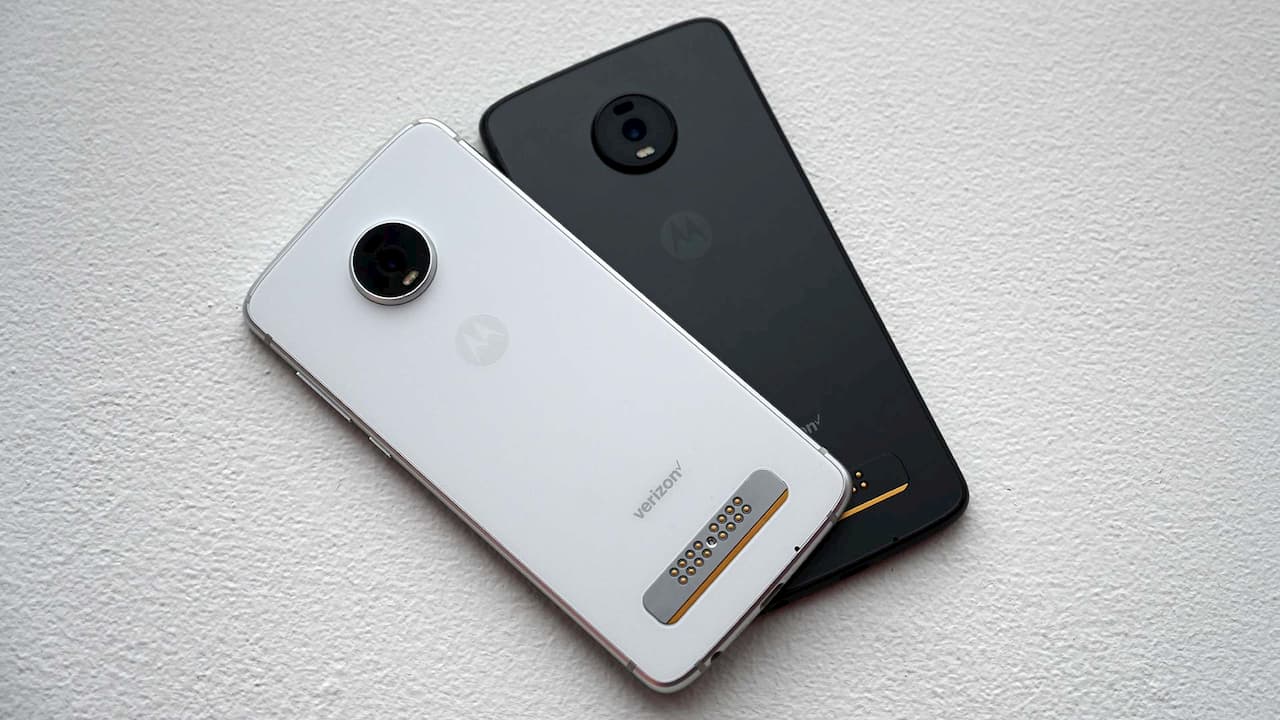 Foto: Sam Rutherford (Gizmodo)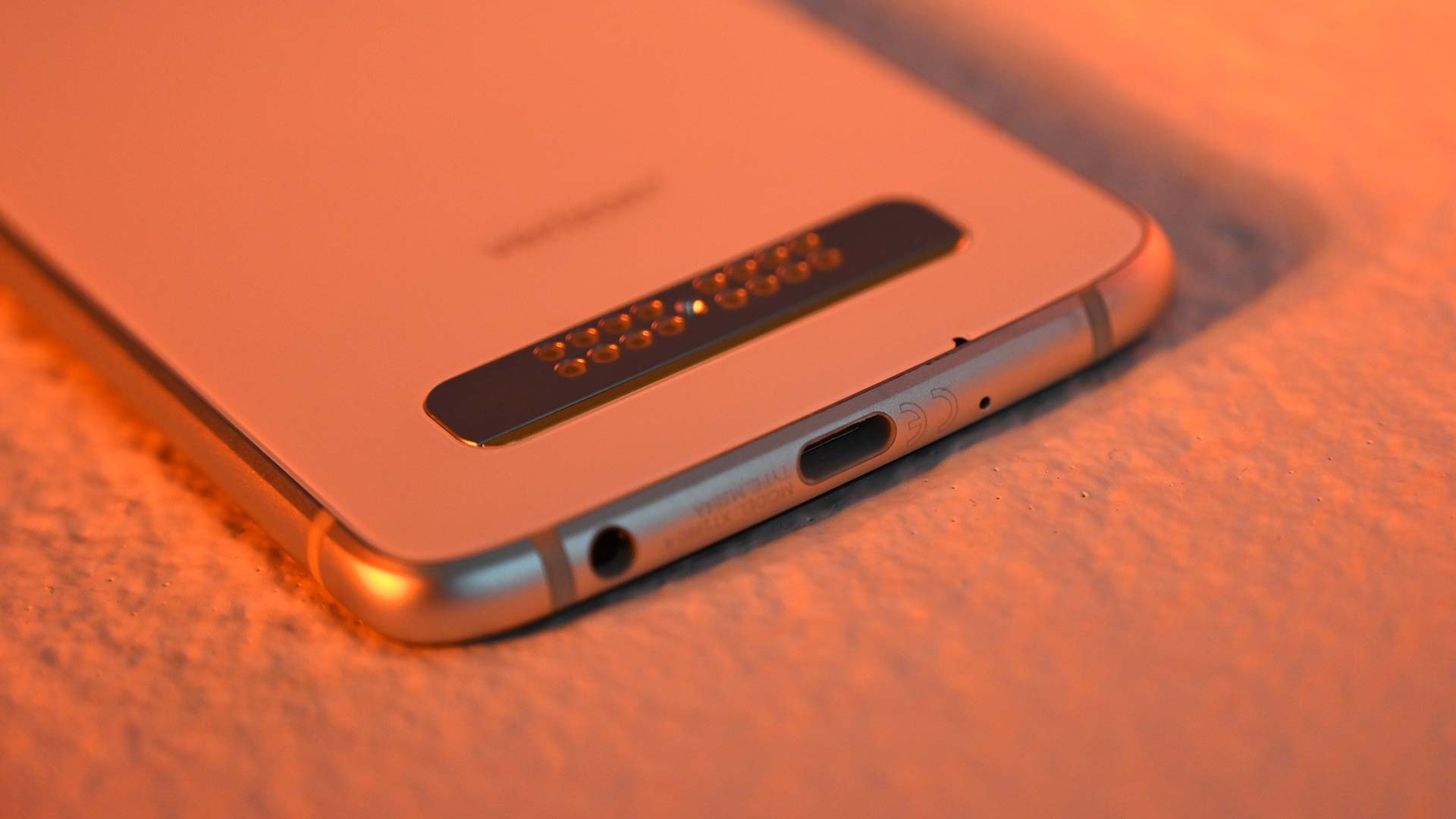
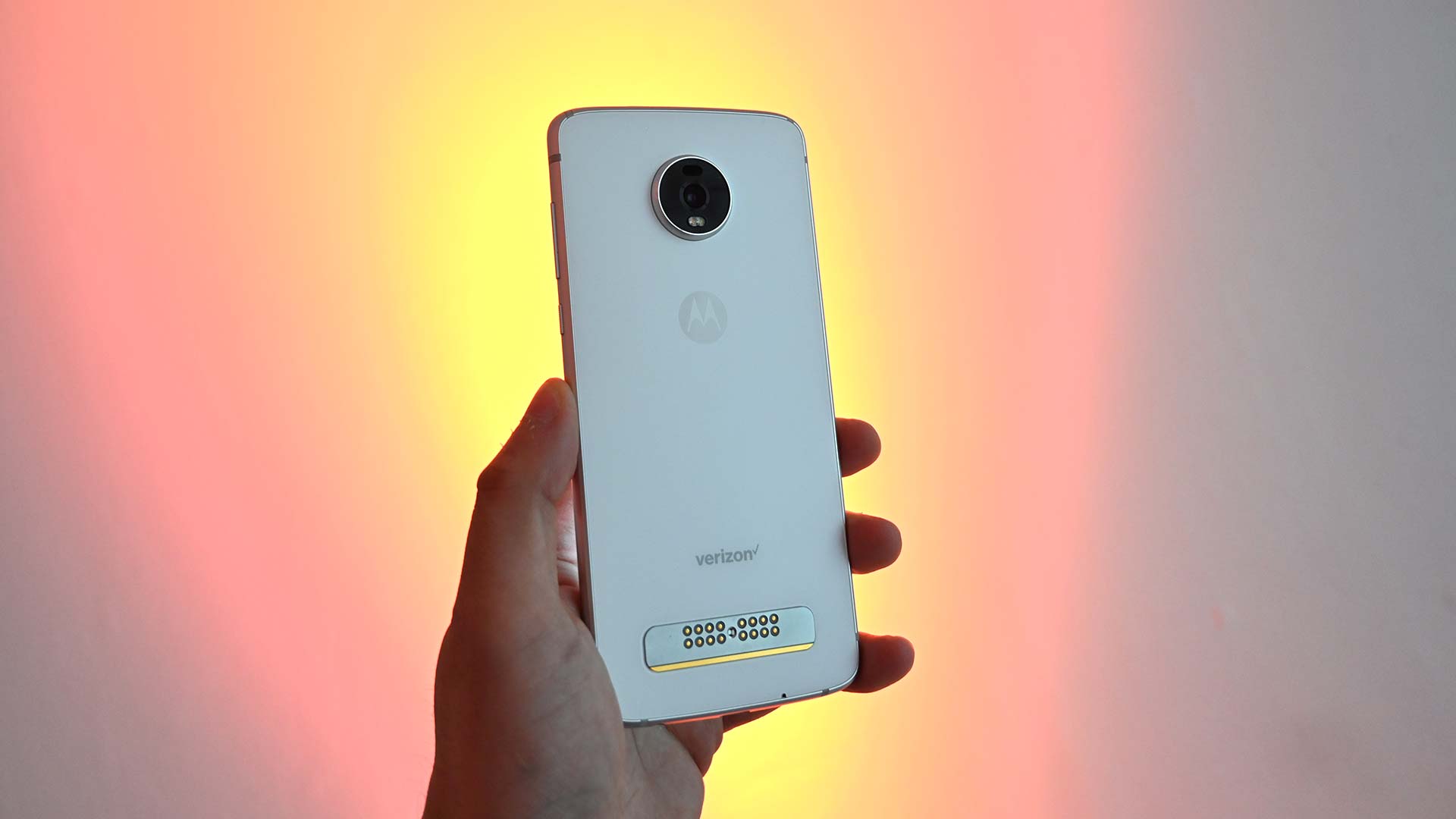
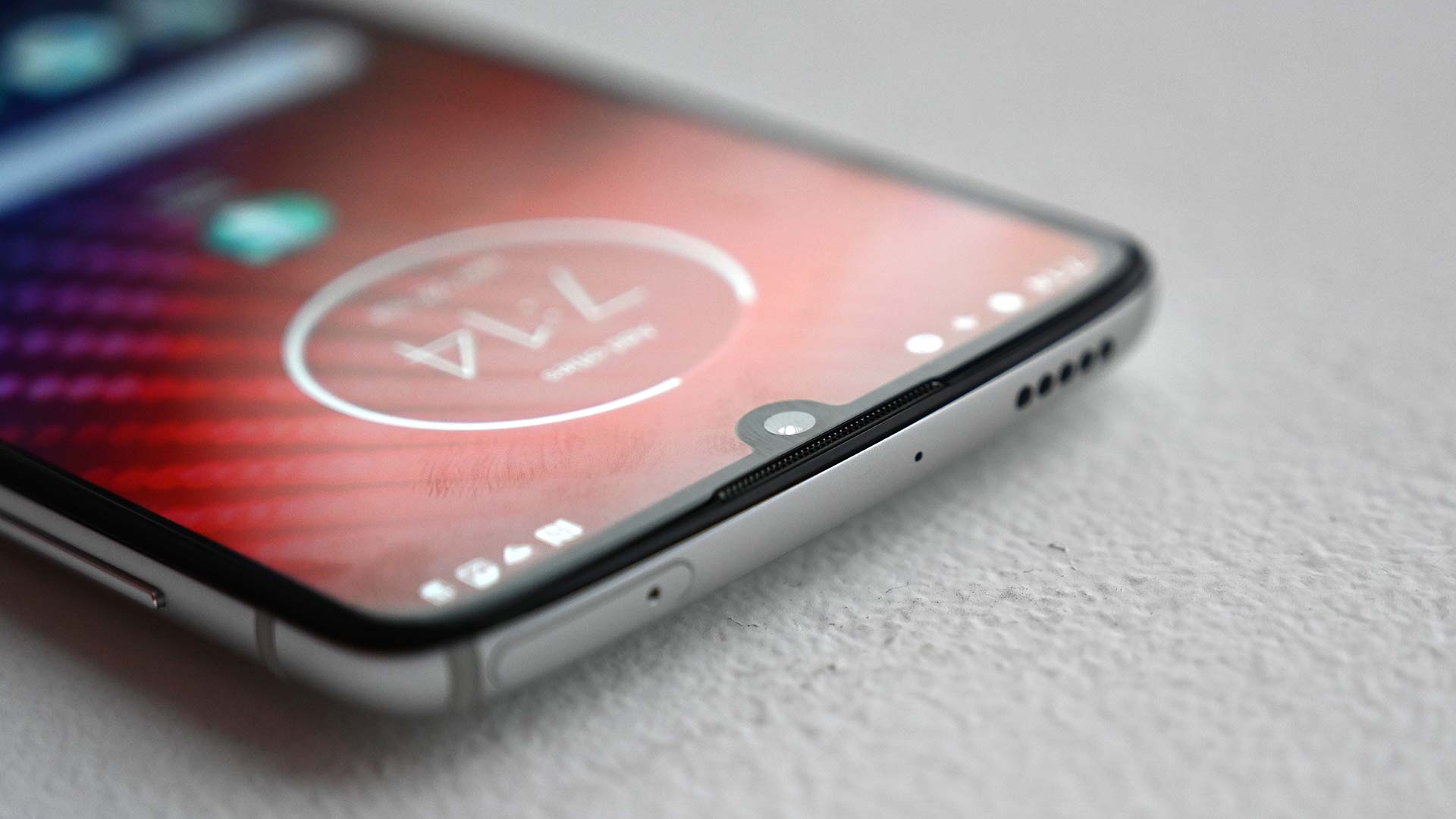

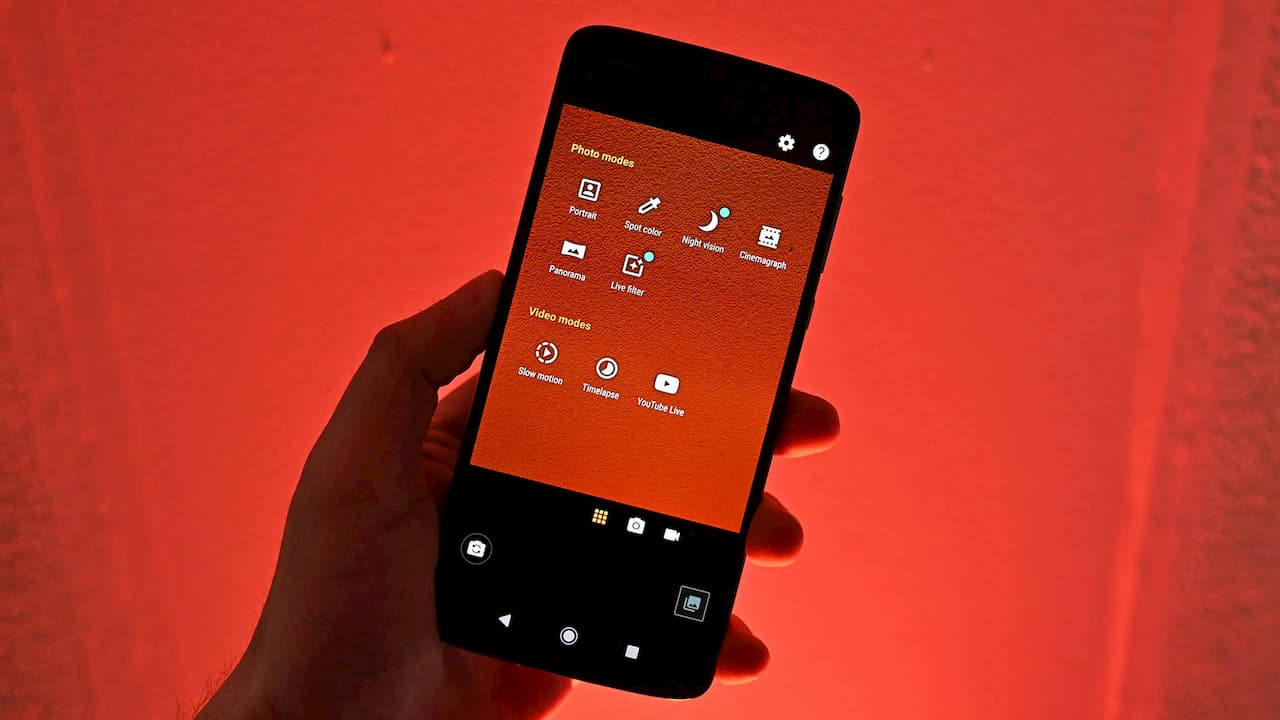
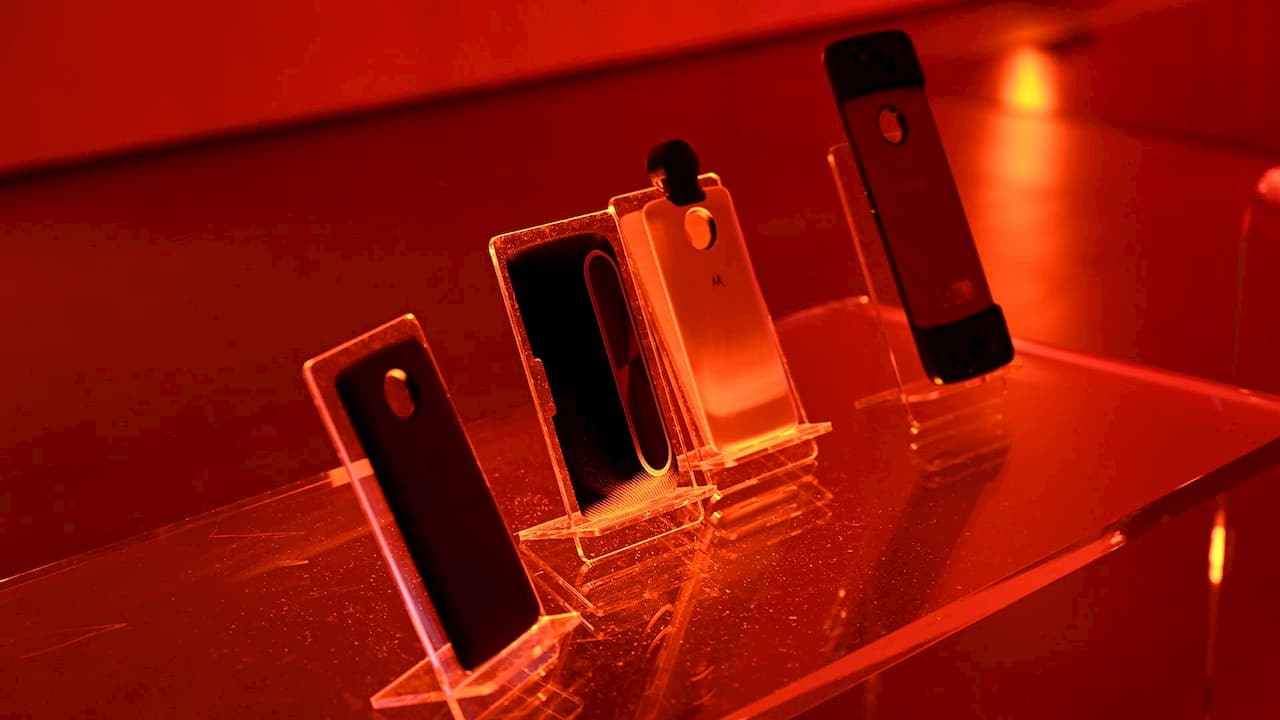

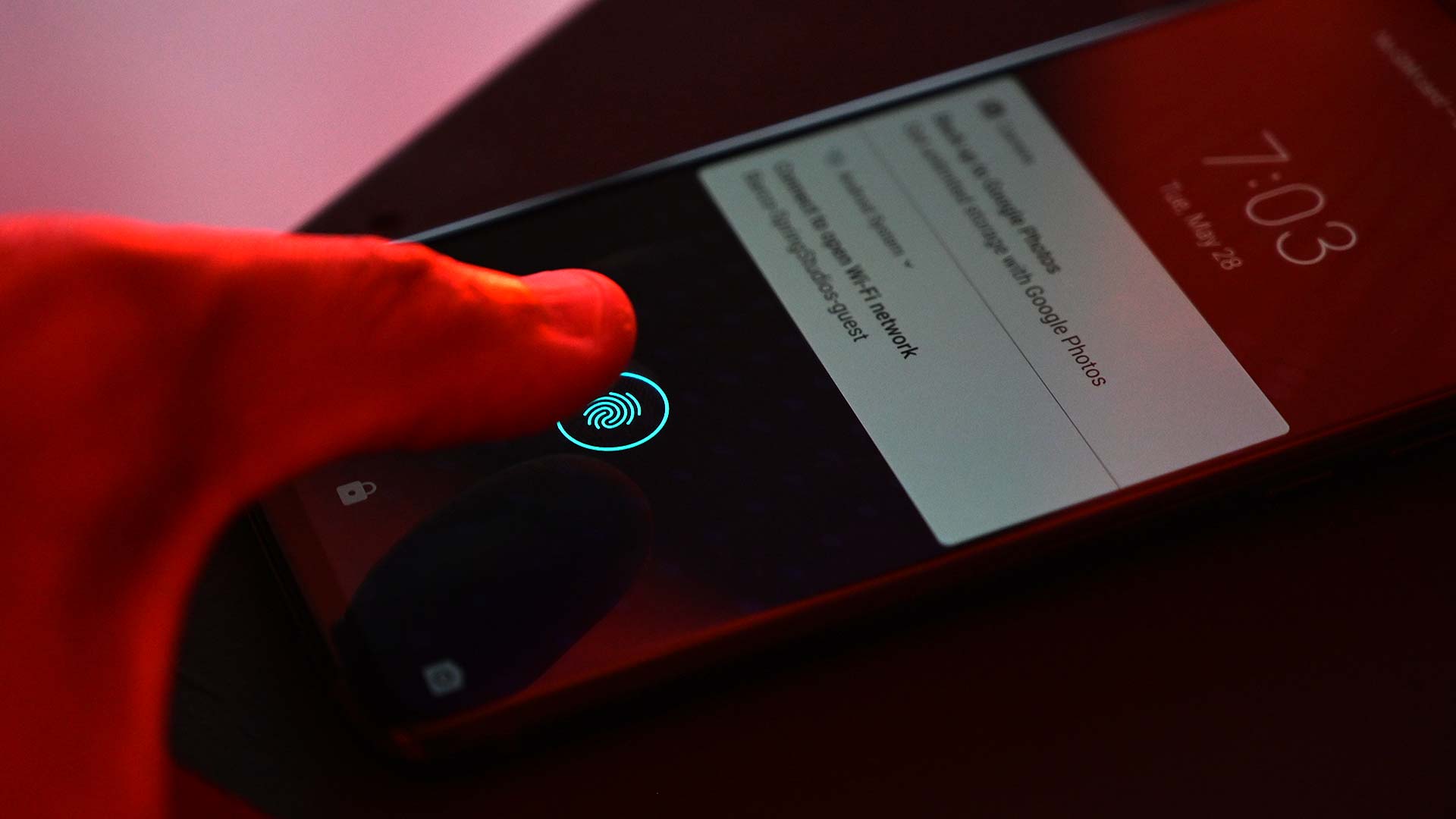
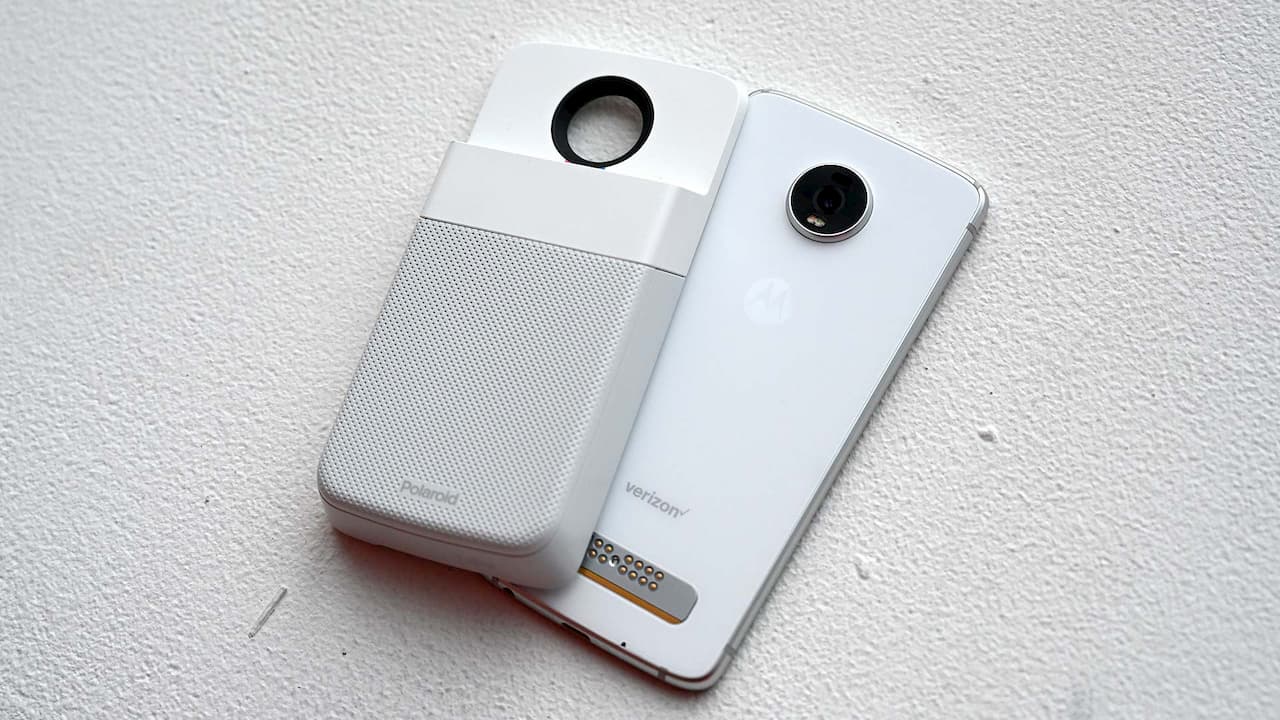 Foto: Sam Rutherford (Gizmodo)